Fixing a Markdown Rendering Bug That Doubao Still Hasn't Fixed
Fixing a Markdown Rendering Bug That Doubao Still Hasn’t Fixed
Background
In a recent project at work, we needed to parse Markdown generated by an LLM and render it in a WebView on mobile. Along the way we ran into a Markdown rendering problem:
In the AI-generated Markdown, some bold text wasn’t parsed correctly, so the raw asterisks showed up on the page.
After digging in, we found the cause was a specific rule in the markdown-it parser, and we worked around it with a neat preprocessing trick.
Symptoms
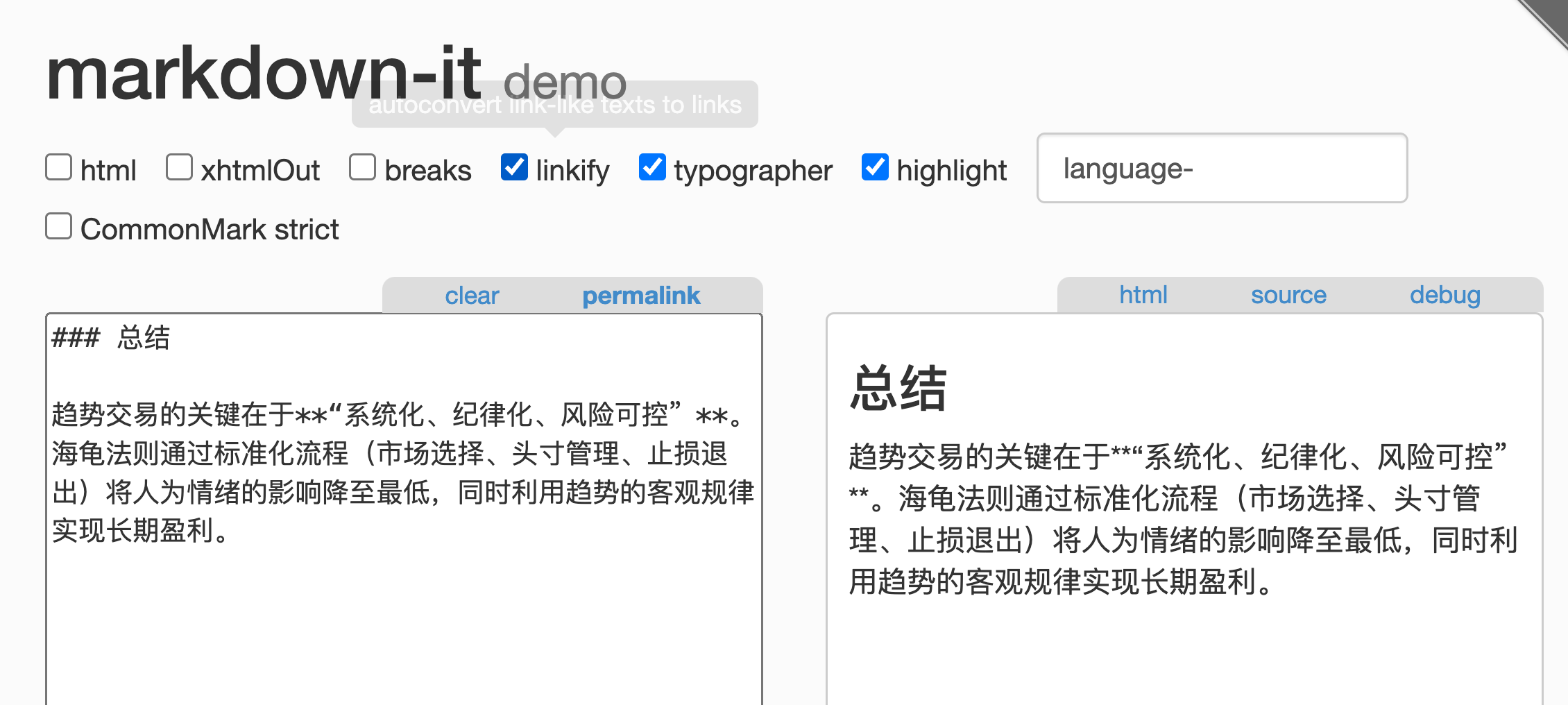
When the AI-generated Markdown contains something like **我是加粗文本**, it should render as 我是加粗文本, but sometimes it comes out as **我是加粗文本** instead, like this:
After reproducing it a bunch of times, we confirmed that the basic cases all work fine:
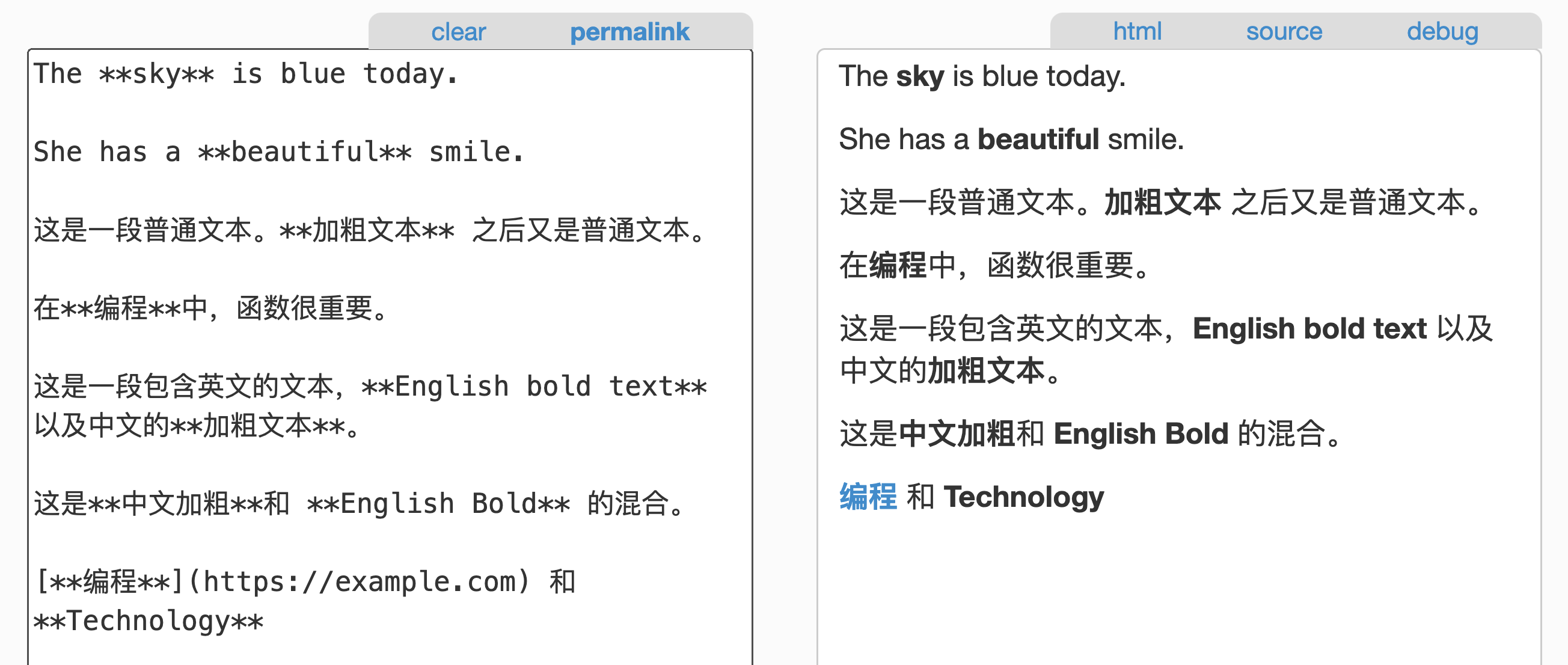
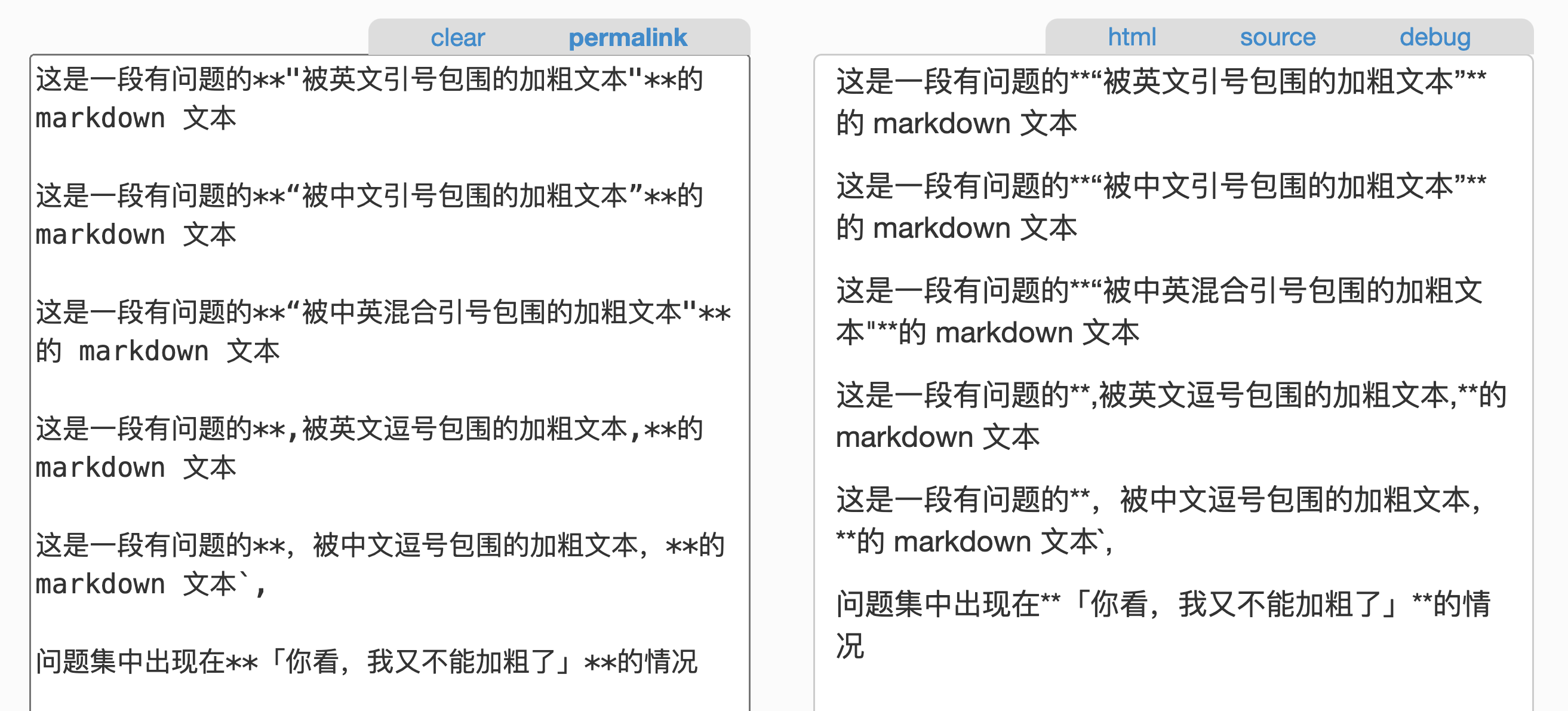
❗The problem clusters around**「double asterisks sitting right next to a punctuation mark (Chinese or English)」**:
If you look closely, you’ll notice that the bold in the very sentence describing the problem 👆 is broken too
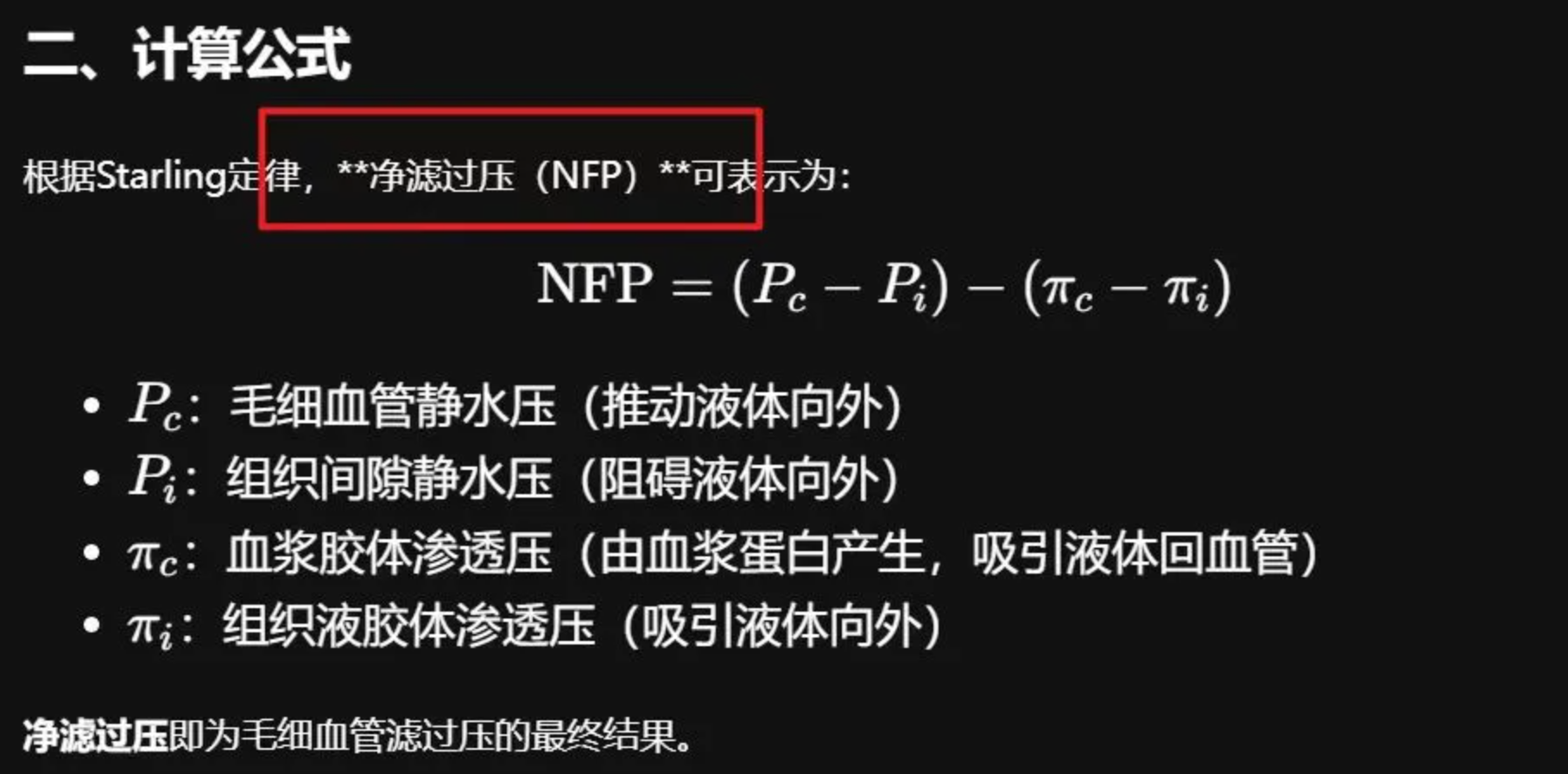
When I was looking into this, around March 11, DeepSeek’s website had the same problem. I thought: well, here’s my chance to brag. Time to dig in 😂
Root Cause
Start with the basic Markdown processing pipeline:
- A tokenizer turns the input Markdown string into tokens
- The tokens are turned into an AST
- Rendering of each AST node is handed off to the developer to customize (or falls back to the built-in default styles)
My suspicion was that when the parser turned the Markdown into tokens, it saw the double asterisks but didn’t treat them as the opening marker of a bold span. So the asterisks were handled as plain text and displayed as-is.
Going through the markdown-it repo’s docs and source code, you can see the parser boils down to three files:
A reasonable guess is that the rule we need to look at is the “bold rule”. Bold text is an inline element, so let’s start with parser_inline.mjs. Sure enough, there’s a rule called emphasis:
const _rules = [
  ['text',            r_text],
  ['linkify',         r_linkify],
  ['newline',         r_newline],
  ['escape',          r_escape],
  ['backticks',       r_backticks],
  ['strikethrough',   r_strikethrough.tokenize],
  ['emphasis',        r_emphasis.tokenize], // here
  ['link',            r_link],
  ['image',           r_image],
  ['autolink',        r_autolink],
  ['html_inline',     r_html_inline],
  ['entity',          r_entity]
]
Opening it up confirms it: this rule exists specifically to handle text wrapped in _ or *, and the core logic should live in this function:
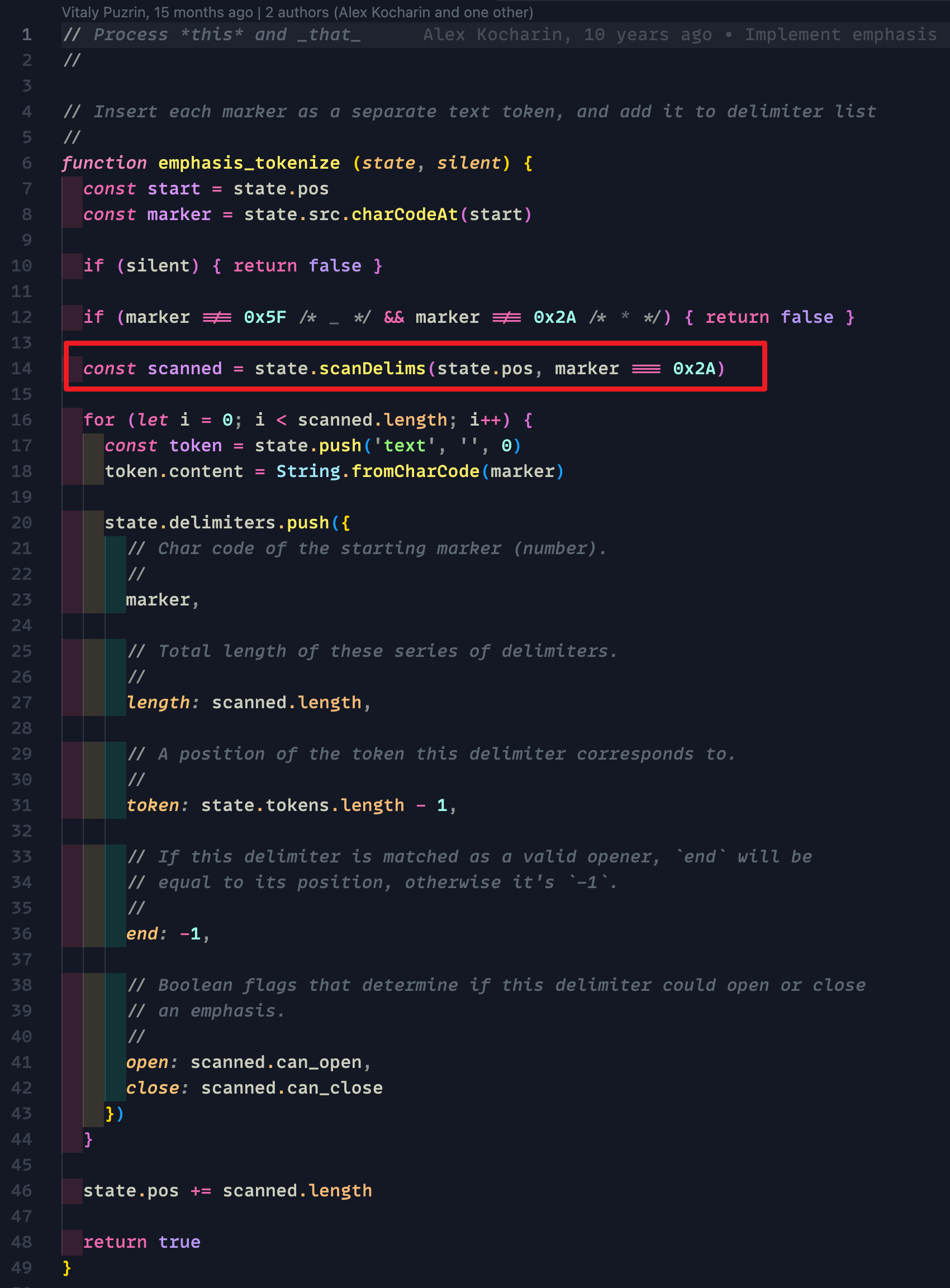
Digging further, between the comment and all the character-position checks, it’s a safe bet this is the code we’re after:
Scan a sequence of emphasis-like markers, and determine whether it can start an emphasis sequence or end an emphasis sequence. In other words: scan the bold markers and decide whether they can open a run of bold text.
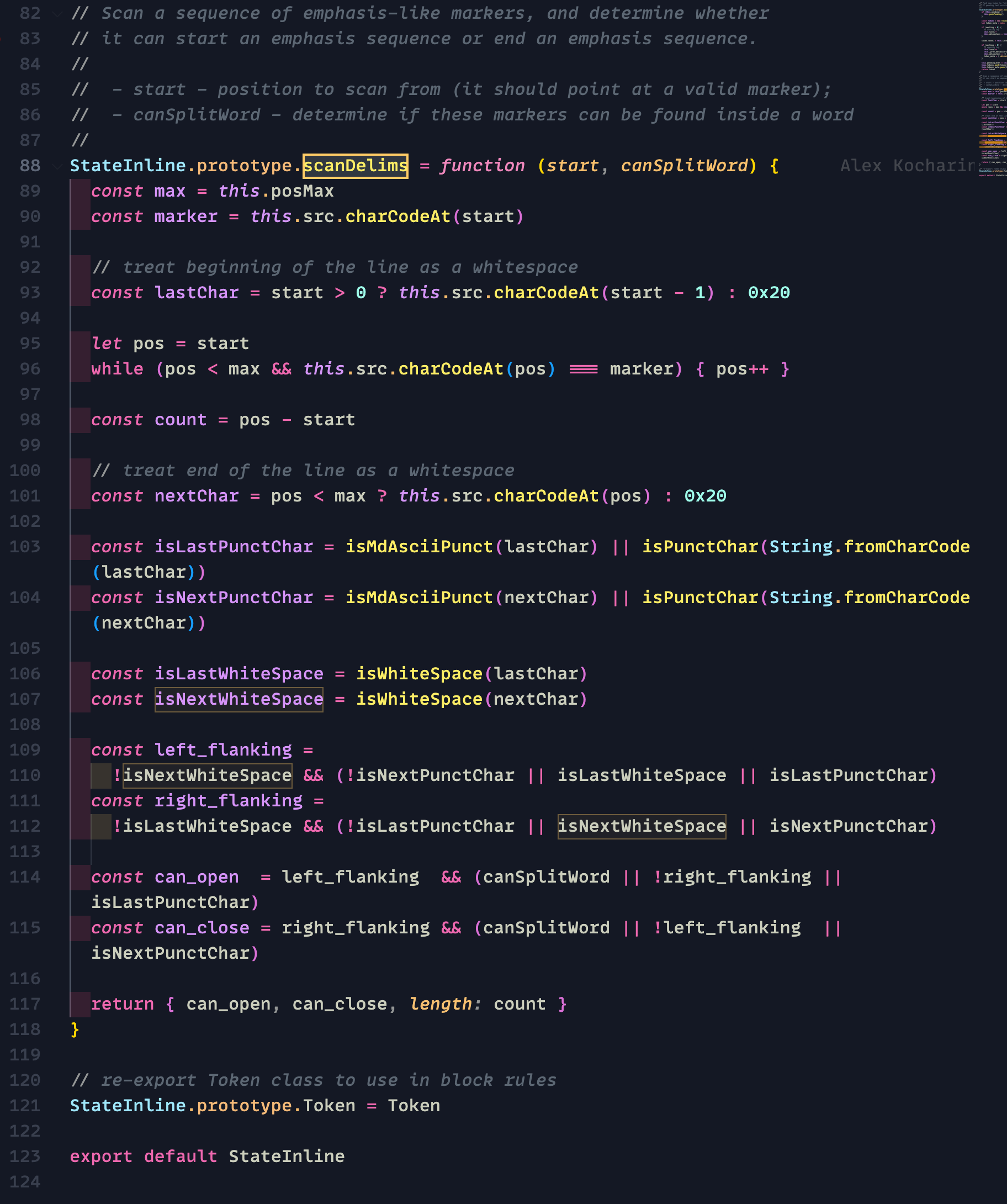
Whether a bold marker can open or close a bold span comes down to the conditions for can_open and can_close.
From the previous snippet, you can see that for asterisk-based bold, the second argument passed in, canSplitWord, is true. So this is equivalent to:
We only need to look at:
- if
left_flankingis true, it can open; otherwise it can’t - same for
right_flanking
Let’s walk through left_flanking (right_flanking is its mirror image, so the same reasoning applies).
We’ll call the characters before and after the double asterisks lastChar and nextChar:
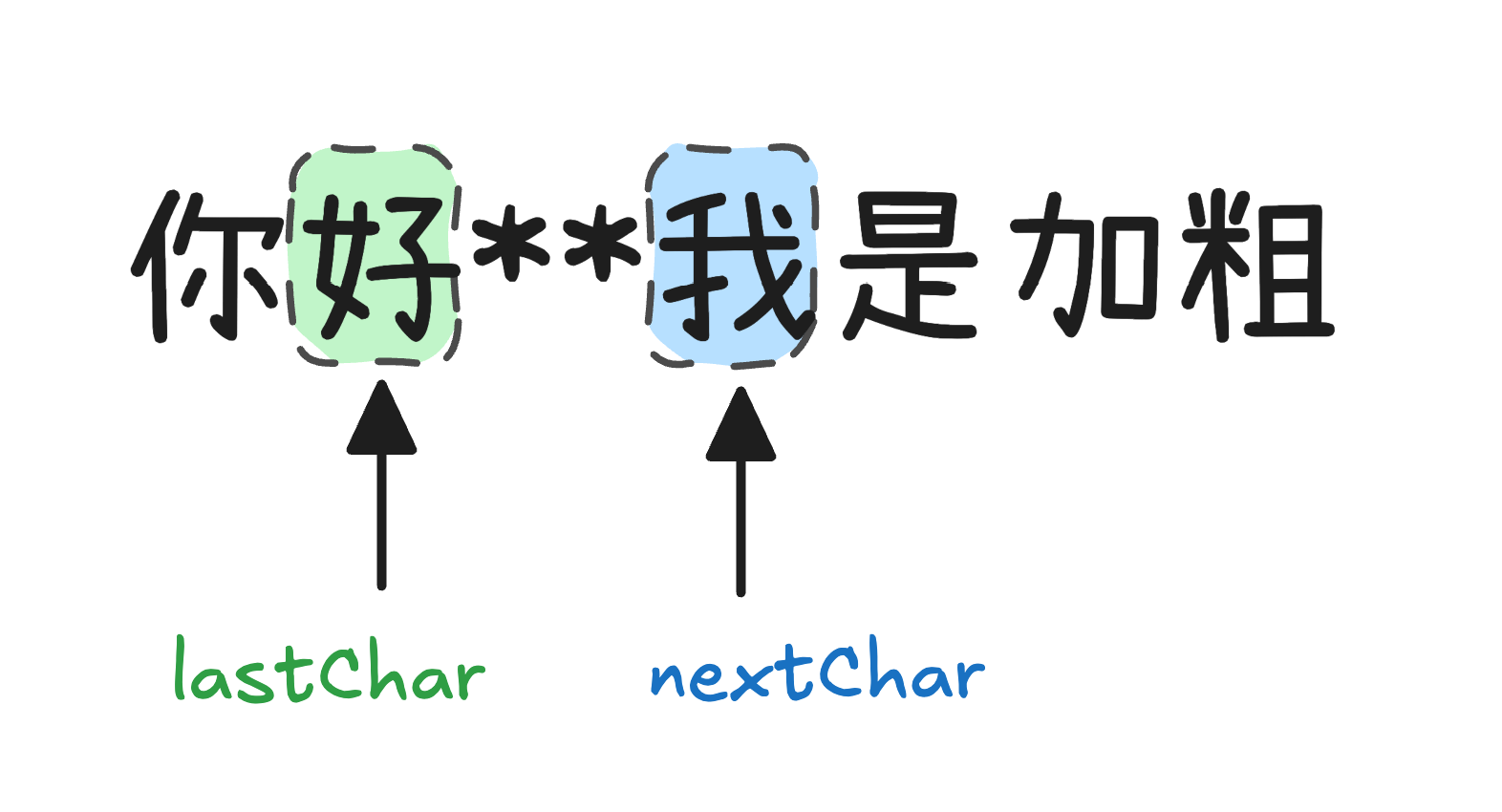
So the condition for double asterisks (**) to be parsed as a bold opener is: nextChar must not be whitespace, and at least one of the following must hold:
- nextChar is not punctuation
- lastChar is whitespace
- lastChar is punctuation
That sounds a bit convoluted, but it’s simple when drawn out:
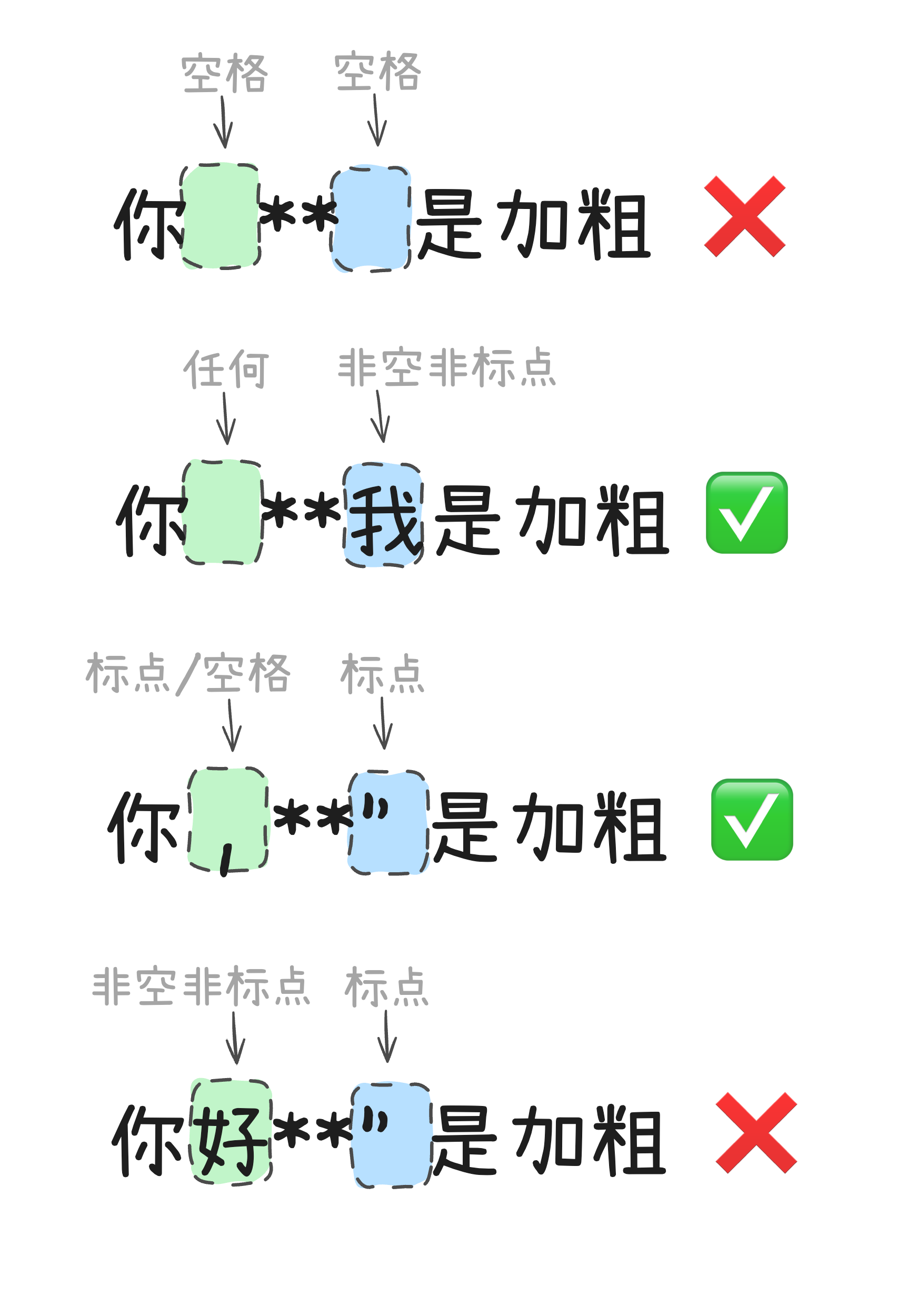
Looking back at our most common bad case, it’s exactly the fourth situation: the double asterisks that should open the bold span are followed by a Chinese/English quotation mark and preceded by a Chinese character (not punctuation), so can_open ends up false.
Approach
Knowing the cause, we still had to fix it. The options basically come down to one of these:
- Modify the parser’s source so our case passes too
- Find a way to turn our case into one the parser accepts
Option 1 essentially “changes the rules” by modifying a shared function in the parsing library, and the blast radius would be hard to pin down in the short term.
Option 2 means finding a gap in the existing rules and slipping through it.
My brilliant colleague @gtbl came up with an idea: add zero-width spaces on both sides of every double asterisk
Let’s go back and see how the parser decides what counts as whitespace:
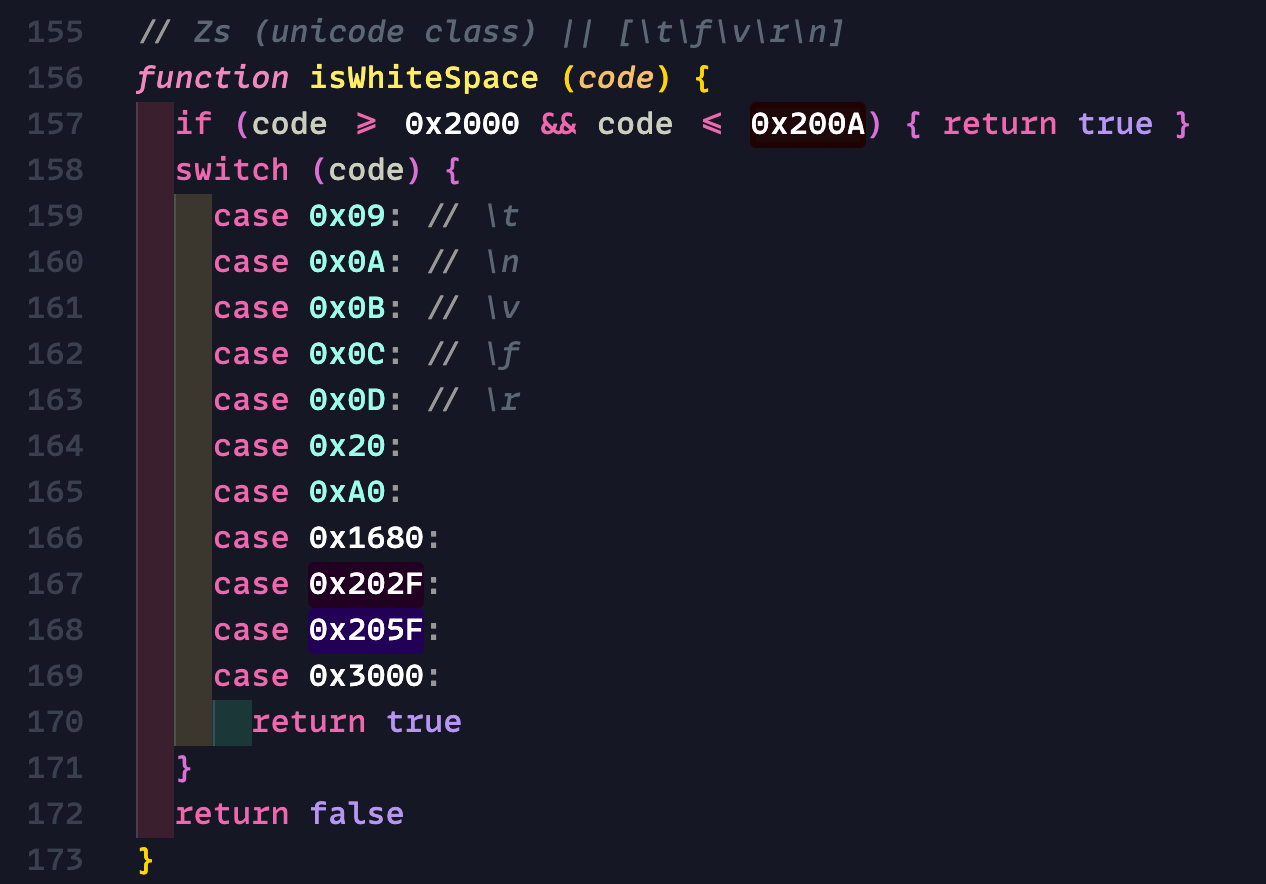
To our delight, the zero-width space slips past this check. In other words, when the parser sees a zero-width space next to the double asterisks, it treats it as a “non-whitespace” character.
So our case now becomes:
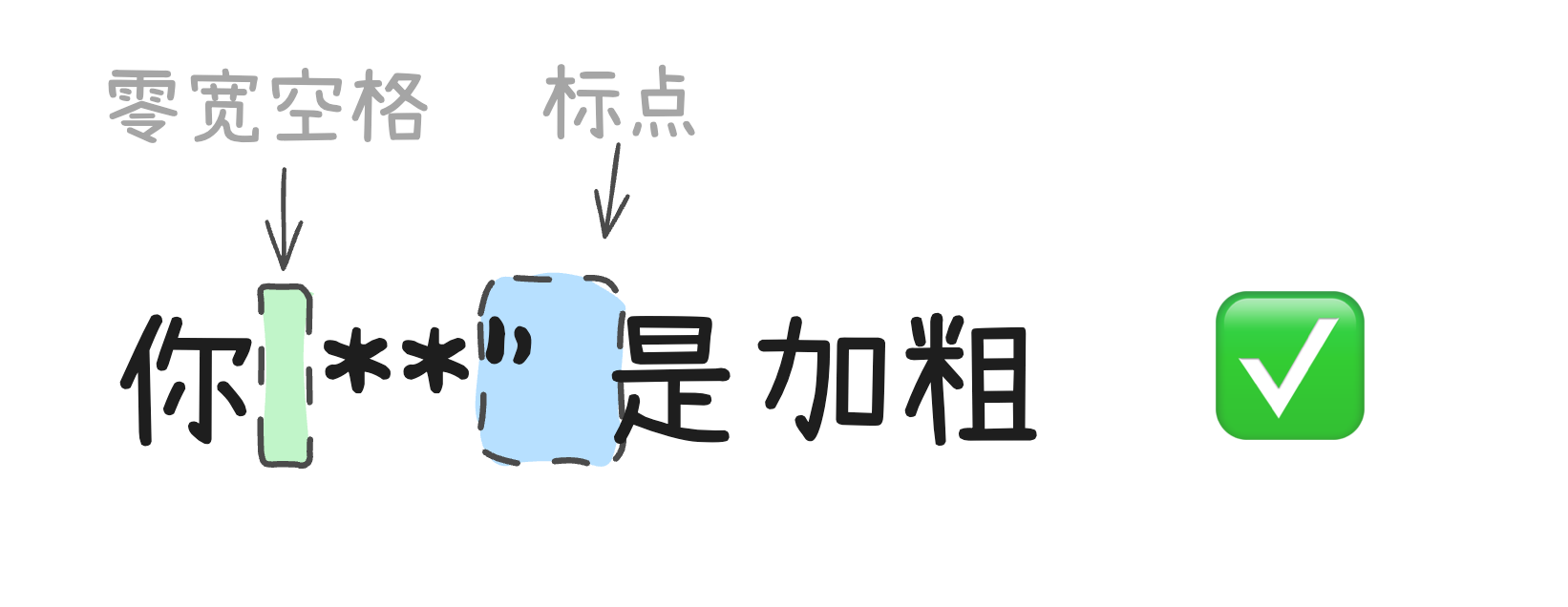
One more small detail: for us (the people using this parser), it’s hard to tell whether a given pair of double asterisks is meant to open or close. So we simply add zero-width spaces on both sides of every double asterisk, and that passes the checks too.
Implementation
In the preprocessing stage, modify the Markdown string: insert a zero-width space () before and after every double asterisk, forcing the asterisks and punctuation apart.
The replace function
Note: because ** gets replaced with **, you need to avoid replacing it over and over.
const addZeroWidthSpaceAroundBoldMarkers = (markdown: string) => {
const TempMark = ''; // Use an uncommon character as a temporary marker
// Step 1: replace ** that is already wrapped in zero-width spaces with the temporary marker
const markedMarkdown = markdown.replace(/\*\*/g, TempMark);
// Step 2: wrap the remaining ** in zero-width spaces
const replacedMarkdown = markedMarkdown.replace(/\*\*/g, '**');
// Step 3: restore the temporary marker to its original form
const finalMarkdown = replacedMarkdown.replace(new RegExp(TempMark, 'g'), '**');
return finalMarkdown;
}Integration example
Call the preprocessing function before rendering with markdown-it:
import MarkdownIt from 'markdown-it';

const md = new MarkdownIt();

// Preprocess the text
const processedText = addZeroWidthSpaceAroundBoldMarkers(aiResponseMarkdown);

// Render
const html = md.render(processedText);
Result
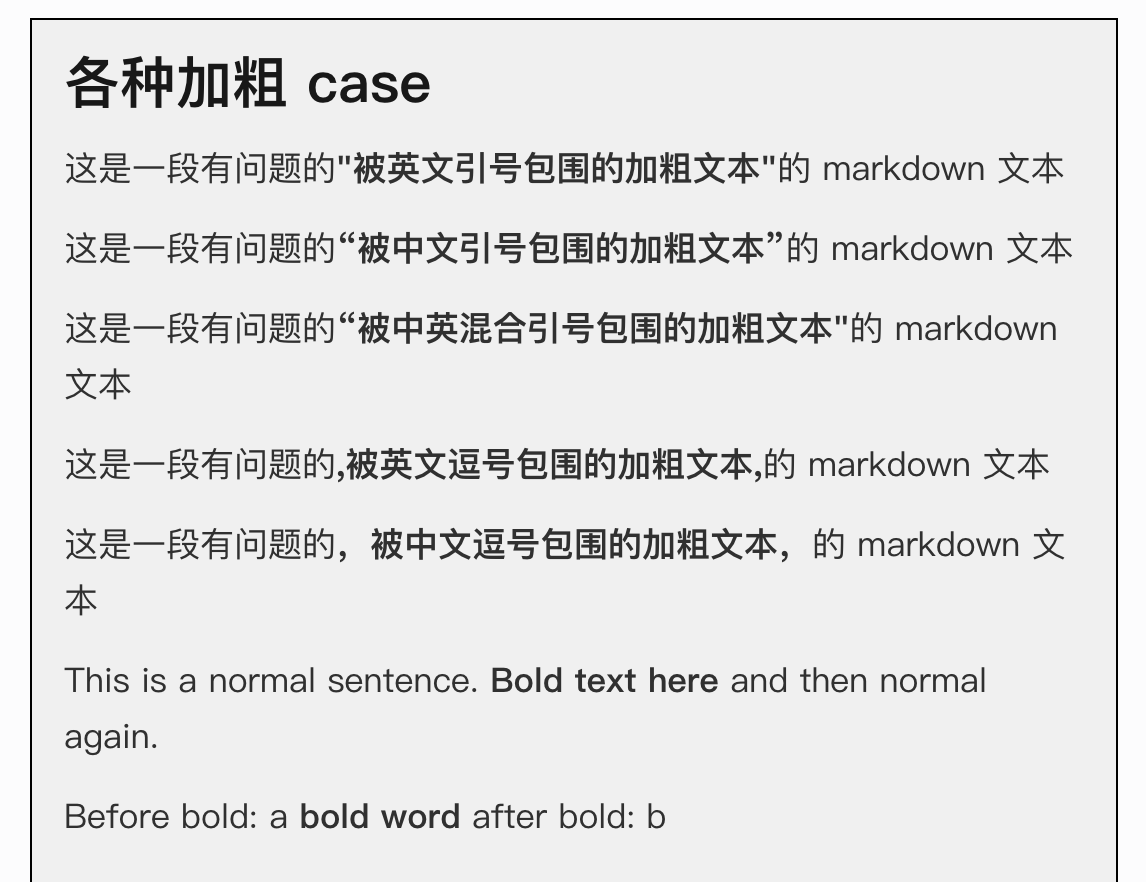
Summary
- The core issue: markdown-it’s parsing rules restrict certain combinations of special characters;
- The fix: use zero-width spaces to break the adjacency between symbols. It doesn’t break the rules; it coexists with them;
- Takeaway: preprocessing is a general-purpose way to work around parser limitations, and it applies to other similar situations.
Thanks to @gtbl for the idea. Seriously impressive.