How Long Is an Emoji, Really? A Deep Dive into Emoji Strings in UTF-16
0 Introduction
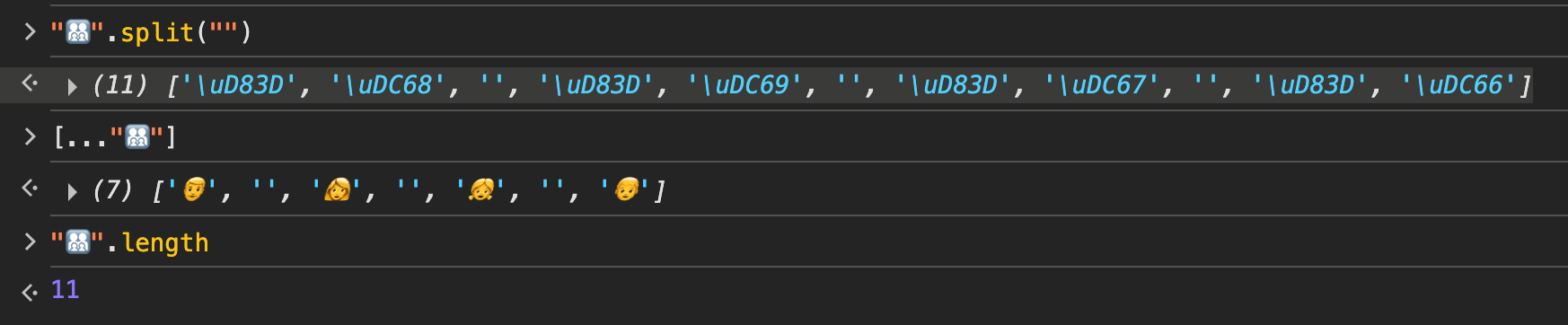
In day-to-day frontend work we deal with emoji all the time. If you’re new to this, you’ve probably run into problems like these:
- You use
spliton a string that contains emoji, and it comes out broken - You read
.lengthon a string with emoji, and the number looks off - Something goes wrong and weird question marks and boxes show up in your text. What are those?
In practice, what we need is pretty clear:
- Display strings containing emoji correctly
- When we need to split text (say, for a character-by-character fade-in animation), split strings containing emoji correctly
- Compute the length of strings containing emoji correctly.
TL;DR: If you don’t have time to dig into how it works, just use runes.js. Copy the source in or install it and you’re good to go. It exports two functions, runes and substr, which correctly split strings containing emoji and take substrings of them. The unminified source is only about 160 lines.
But if we want to understand why, we need to dig a little deeper. While reading through the runes.js source, I picked up some common emoji patterns along the way. They’re actually pretty fun, so let me walk you through them.
1 Background
First, a quick primer on character encoding. If you already know this stuff, feel free to skip ahead.
Note: this isn’t copy-pasted from an AI answer. I’ll introduce every concept you need in my own words.
Unicode
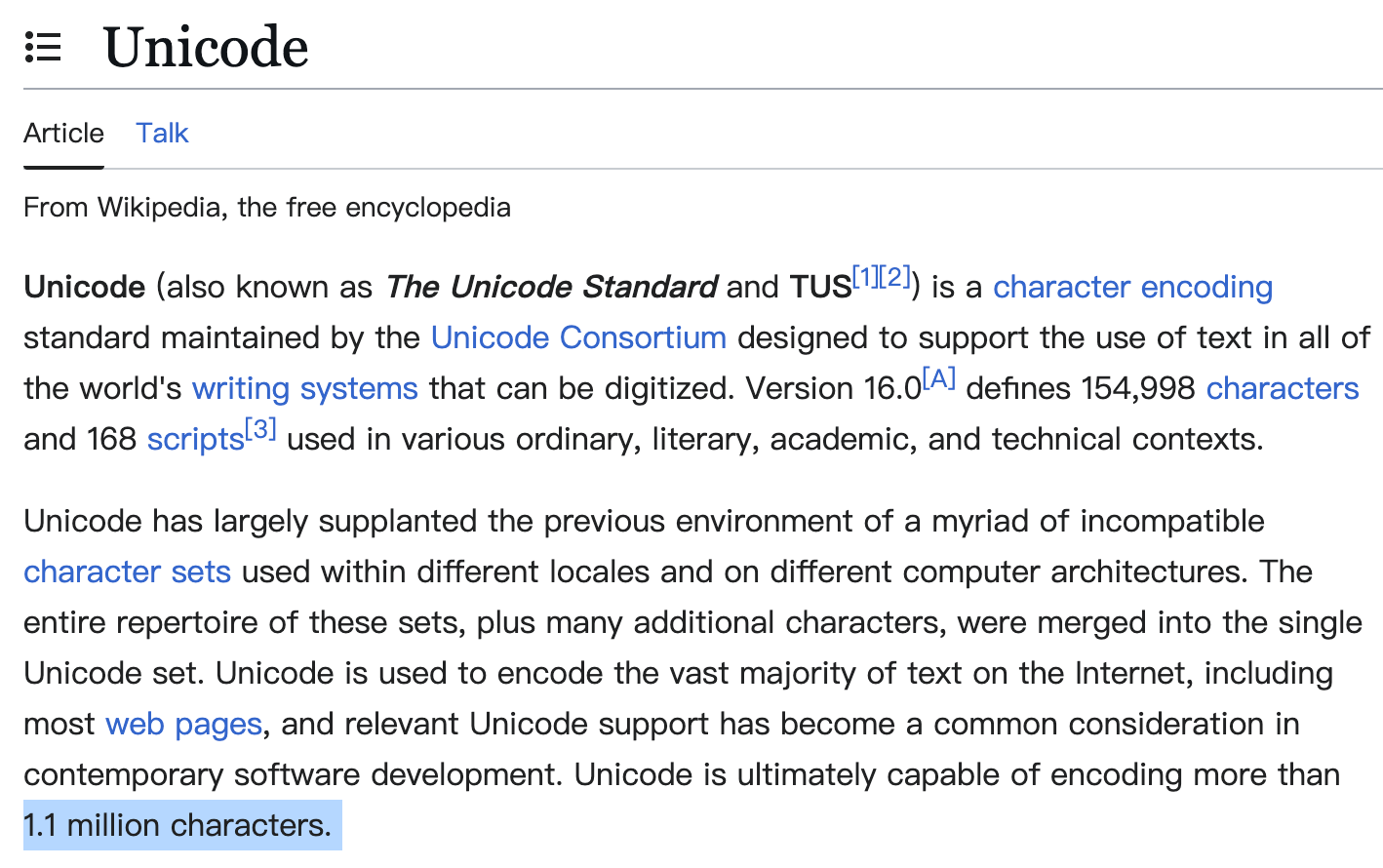
Unicode is the industry standard for character encoding in computing. It assigns a single, unique binary code to every character in every language. According to Wikipedia, version 16.0 contains 154,998 characters.
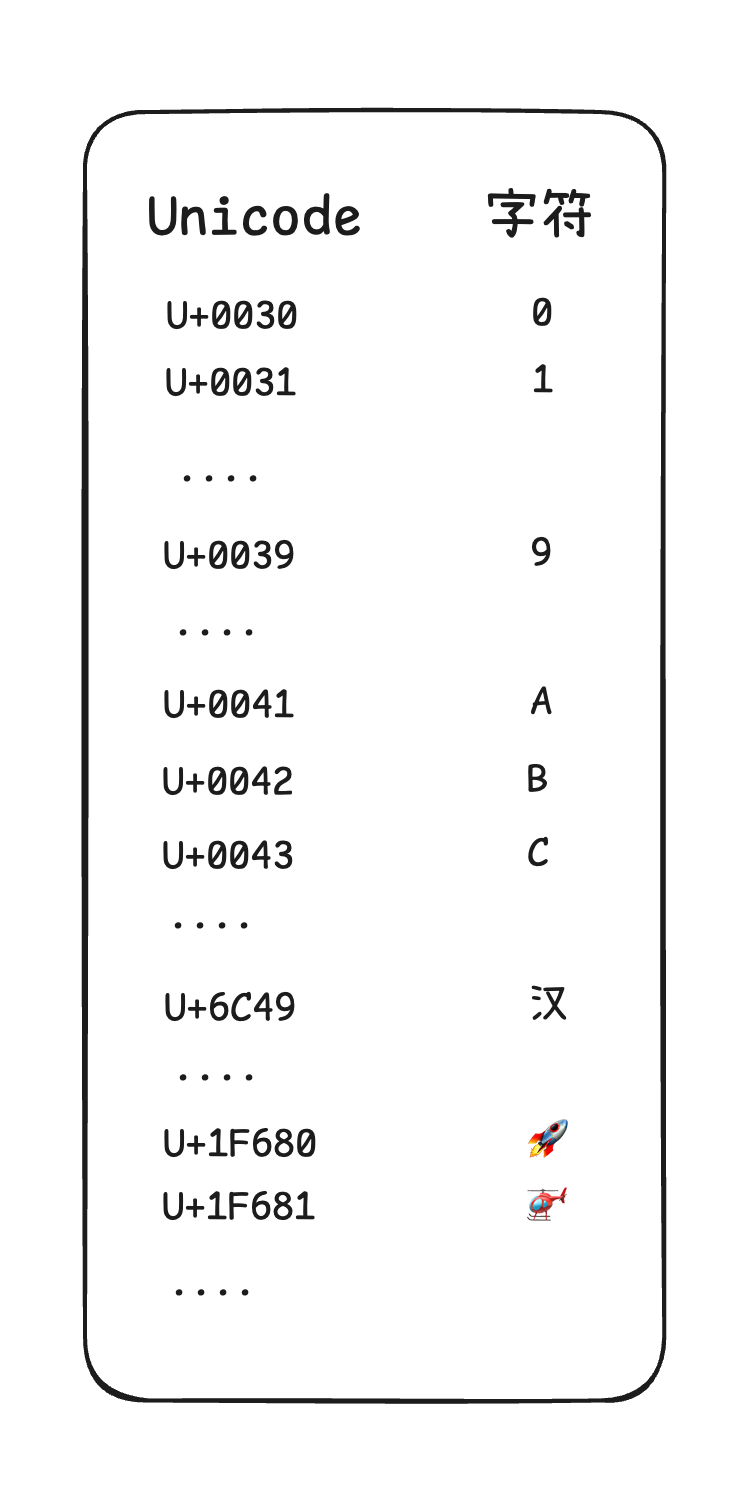
It’s actually simple to think about: it’s one giant map with 154,998 entries, where each entry’s key is a number and the value is the actual character.
The key here is called a Code Point.
A code point, i.e. UnicodeMap[key], uniquely identifies one character.
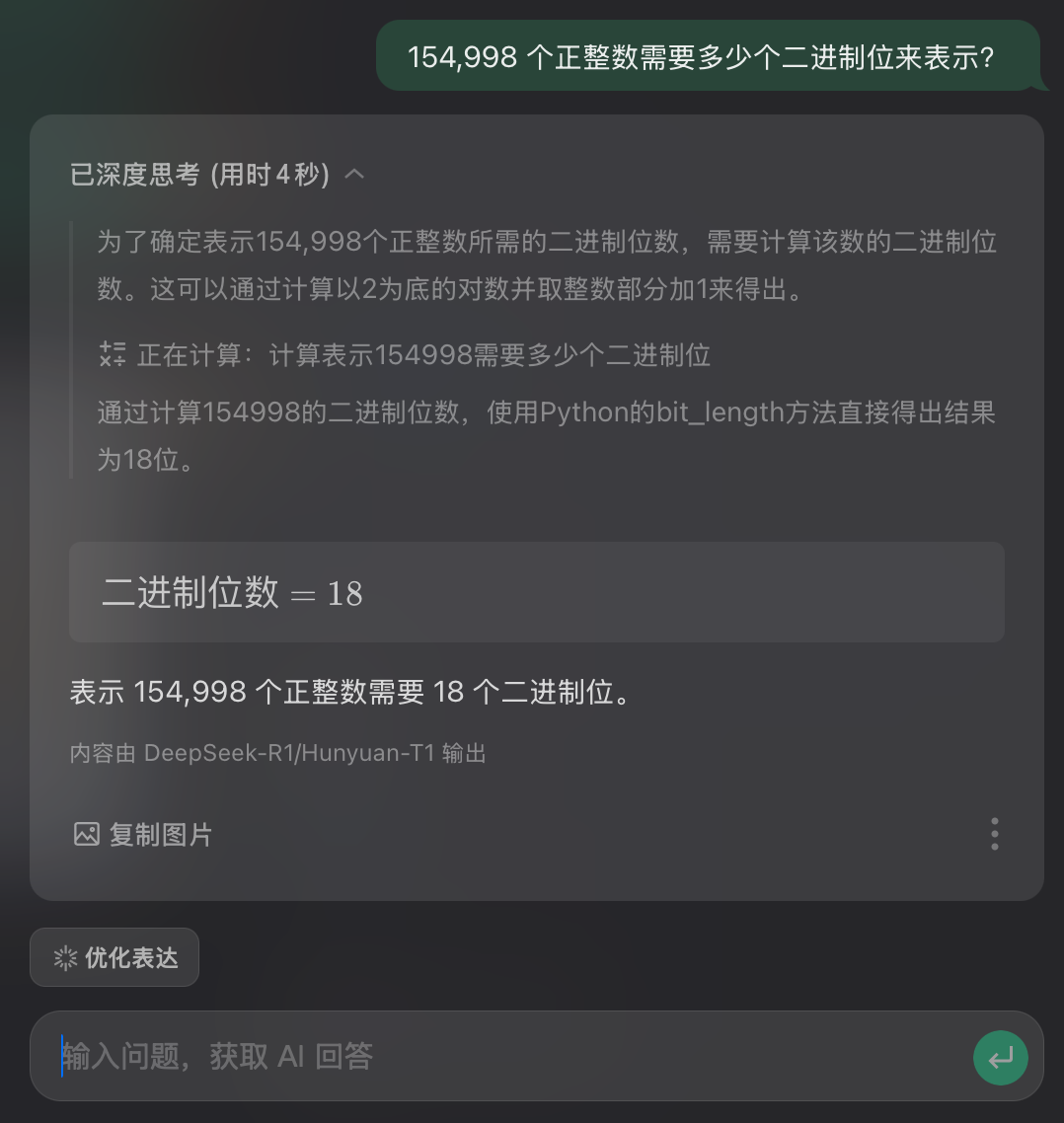
The curious among you may already be reaching for a calculator: this map has at least 154,998 keys, so how many bits does a key need?
You can work it out yourself, or ask the AI built into the WeChat keyboard like I did. Either way, the answer is 18 bits.
In reality, though, the Unicode standard reserves more room than that. Code points range from 0x0 to 0x10FFFF, which can hold roughly 1.1 million characters.
That’s why Wikipedia says Unicode can hold 1.1M+ characters.
Now someone will ask: by that logic, you need 24 bits in total, which is 3 bytes. Does a computer really need 3 bytes to store one character? That’s not what I learned. Isn’t char one byte?
Think about it for a second: in a map that big, the keys at the very front are surely short. Can’t we compress them?
Exactly. Since some characters have short code points, there’s no point wasting space on them. That’s where the familiar encodings like UTF-8, UTF-16 and UTF-32 come from.
- UTF-8: A variable-length encoding that uses 1 to 4 bytes per character. It’s backward compatible with ASCII, and it’s by far the most widely used encoding for the web and file storage.
- UTF-16: Also variable-length, using either 2 or 4 bytes per character. It’s mainly used in systems and technologies like Windows, Java and JavaScript.
- UTF-32: A fixed-length encoding where every character takes exactly 4 bytes. Its advantage is that the encoding rules are simple and direct, but it uses a lot more storage.
Let’s set UTF-32 aside. Both UTF-8 and UTF-16 are variable-length, so suppose you want to represent a sequence of characters as an array. How would you do it?
If you’re using a dynamically typed language like JavaScript or Python, you’d say: what’s the problem? That’s trivial.
If you’re using a statically typed language like C, you start scratching your head. A plain char[] won’t do, because anything longer than 1 byte won’t fit. Go bigger with something like uint32_t[] and you waste space.

There’s a fairly obvious fix: use the smallest possible number of bytes as the size of each element. In a given encoding, every other supported byte count is a multiple of this base unit, so that works.
For example, the smallest unit in UTF-8 is 1 byte, so I use char[]. When a character needs 2 or 3 bytes, it just takes up 2 or 3 elements.
The smallest unit in UTF-16 is 2 bytes, so I use uint16_t[]. When a character needs 4 bytes, it takes up 2 elements.
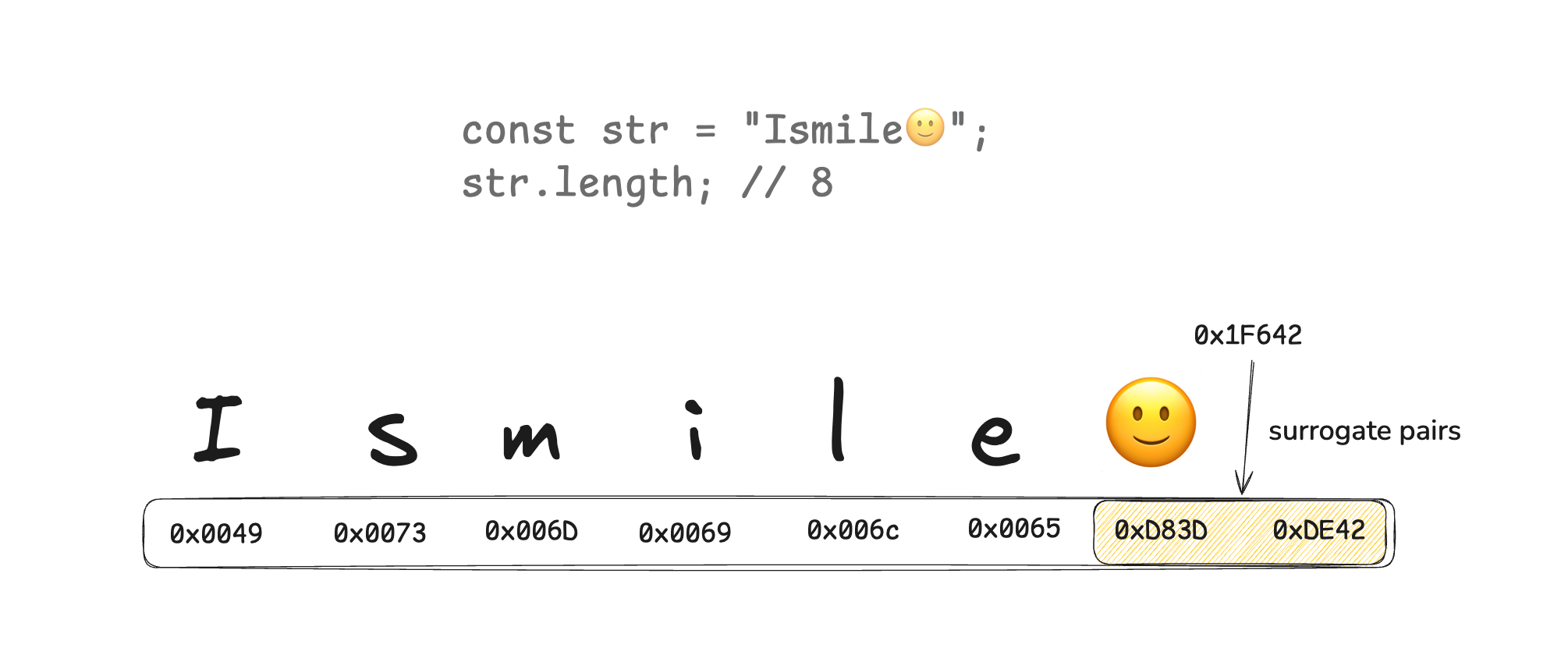
That’s where the concept of a Code Unit comes from.
With code units, no matter which encoding I use, my character array is just CodeUnit[].
UTF-16
Back to the main topic. We’re mostly talking about how to handle emoji correctly in JS, so what encoding does a JavaScript String use? UTF-16.
As we just said, a UTF-16 code unit is 2 bytes, or 16 bits. So which keys in our giant Unicode map can be stored in a single UTF-16 code unit?
The answer is keys from 0x0 to 0xFFFF. Anything larger needs two code units to fit.
This is a bit like manually splitting a map into segments. Unicode splits itself into segments too, and that’s where the Basic Multilingual Plane (BMP) and the supplementary planes come from.
Unicode actually splits it into many segments, but to keep things simple, people usually talk about just two:
- Basic plane:
0x0to0xFFFF,0x10000characters in total, covering a huge number of commonly used characters. - Supplementary planes:
0x10000to0x10FFFF,0xFFFFFcharacters in total, holding less commonly used characters. Most emoji live here.
As we just said, the supplementary planes hold 0xFFFFF characters. In binary that takes 20 bits, and a UTF-16 code unit only has 16, so it won’t fit.
Then use two code units. The obvious idea: you’ve got 20 bits, so split them into the high 10 bits and the low 10 bits and put each half in its own code unit. Done?
OK, but that raises another question. If you were writing a parser for UTF-16 character sequences, how would you write it? When you hit a code unit, how do you know whether it stands on its own or has to be read together with the one after it?
So some of the bits must be used as markers, telling the parser: when you see me, look one unit further.
That’s where the UTF-16 reserved ranges in the basic plane come from.

The Unicode basic plane reserves two ranges for UTF-16. On top of that, people came up with Surrogate Pairs, which split a supplementary-plane code point into its high 10 bits and low 10 bits and pack them into two code units that land exactly inside those ranges.
Surrogate pairs
So how does it actually work? In short, you first subtract 0x10000, which gives you the offset within the supplementary planes. This offset is 20 bits.
To pack those 20 bits into a surrogate pair, take the high 10 bits and add 0xD800 to get the first code unit (the high surrogate); then take the low 10 bits and add 0xDC00 to get the second code unit (the low surrogate). That’s it.
Steps in plain words:
- Subtract 0x10000 from the code point, giving a value in the range 0~0xFFFFF (at most 20 bits)
- Add 0xD800 to the high 10 bits to get the high surrogate (range 0xD800~0xDBFF)
- Add 0xDC00 to the low 10 bits to get the low surrogate (range 0xDC00~0xDFFF)
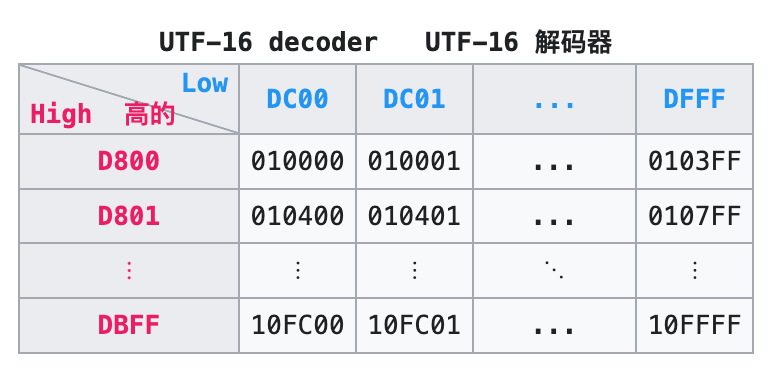
So a surrogate pair can be written as (high surrogate, low surrogate), and combining the two gives you the actual code point.
In code:
Code probably makes it clearer:
const HIGH_SURROGATE_START = 0xd800
const LOW_SURROGATE_START = 0xdc00

function surrogatePairFromCodePoint(codePoint: number): string {
  // Validate that the input is a valid code point (U+0000 to U+10FFFF)
  if (!Number.isInteger(codePoint) ||
      codePoint < 0 ||
      codePoint > 0x10FFFF) {
    throw new RangeError('Invalid code point');
  }

  // Characters in the Basic Multilingual Plane (BMP) don't need a surrogate pair
  if (codePoint <= 0xFFFF) {
    return String.fromCodePoint(codePoint);
  }

  // Compute the high and low surrogates
  const offset = codePoint - 0x10000;
  const high = HIGH_SURROGATE_START + (offset >> 10);
  const low = LOW_SURROGATE_START + (offset & 0x3FF);

  // Convert to a UTF-16 surrogate pair string
  return String.fromCharCode(high, low);
}
Going the other way, how do you turn a surrogate pair back into a code point? You just run the steps above in reverse: subtract 0xD800 from the first code unit and shift it left by ten bits, add the second code unit minus 0xDC00, then add 0x10000. See the code below
const HIGH_SURROGATE_START = 0xd800
const LOW_SURROGATE_START = 0xdc00

function codePointFromSurrogatePair (pair: string): string {
  const highOffset = pair.charCodeAt(0) - HIGH_SURROGATE_START
  const lowOffset = pair.charCodeAt(1) - LOW_SURROGATE_START
  return (highOffset << 10) + lowOffset + 0x10000
}
At this point we’ve covered how every Unicode character is encoded in UTF-16. So what does this have to do with emoji?
We can already answer one of the questions from the start: why the length of a string with emoji looks off.
Take the grinning face 😀. Its code point is 0x1F600, which is in a supplementary plane. As a surrogate pair it’s 0xD83D 0xDE00, taking up two code units. According to the MDN docs, a String’s length property returns the number of UTF-16 code units.
The length data property of a String value contains the length of the string in UTF-16 code units.
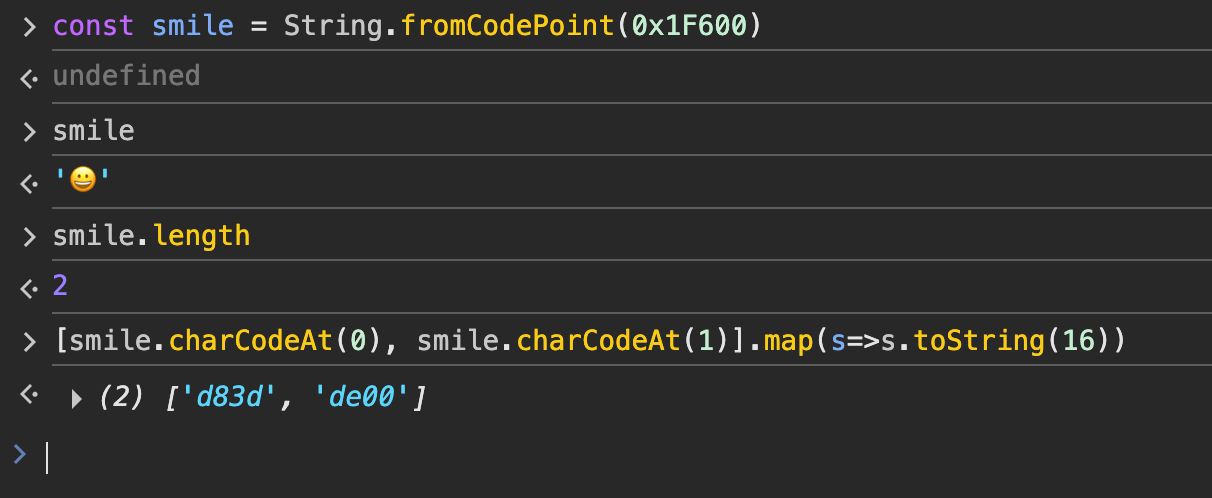
Now someone asks: fine, I get 2 code units. But what on earth is this one with 11??
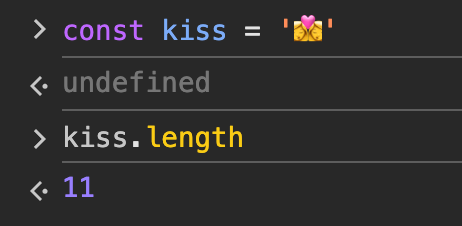

Hold on. JS isn’t lying to you. It really does take 11 code units to represent that one.
Next, I’ll go through the common patterns emoji are built from.
2 Common emoji types and how they’re composed
Emoji are not as simple as they look. There’s a lot of composition logic inside them.
The most common: a single code point
This is mostly the first wave of basic emoji, for example:
| Emoji | Unicode code point | UTF-16 surrogate pair |
|---|---|---|
| 😀 | U+1F600 | 0xD83D,0xDE00 |
| 🤪 | U+1F92A | 0xD83E,0xDD2A |
| 🦊 | U+1F98A | 0xD83E,0xDD8A |
| 🚀 | U+1F680 | 0xD83D,0xDE80 |
| … | … | … |
// If you want to play with this in the browser, here are some examples
String.fromCodePoint(0x1F98A); // 🦊
String.fromCharCode(0xD83E,0xDD8A); // 🦊
'🦊'.charCodeAt(0).toString(16); // D83E
'🦊'.charCodeAt(1).toString(16); // DD8A
'🦊'.codePointAt(0).toString(16); // 1F98A
Note: U+1F600 and 0x1F600 are just two conventional notations. Both refer to a Unicode code point
Skin tone modifiers
You’ve probably used this: both the Apple keyboard and the WeChat keyboard let you pick a skin tone for emoji
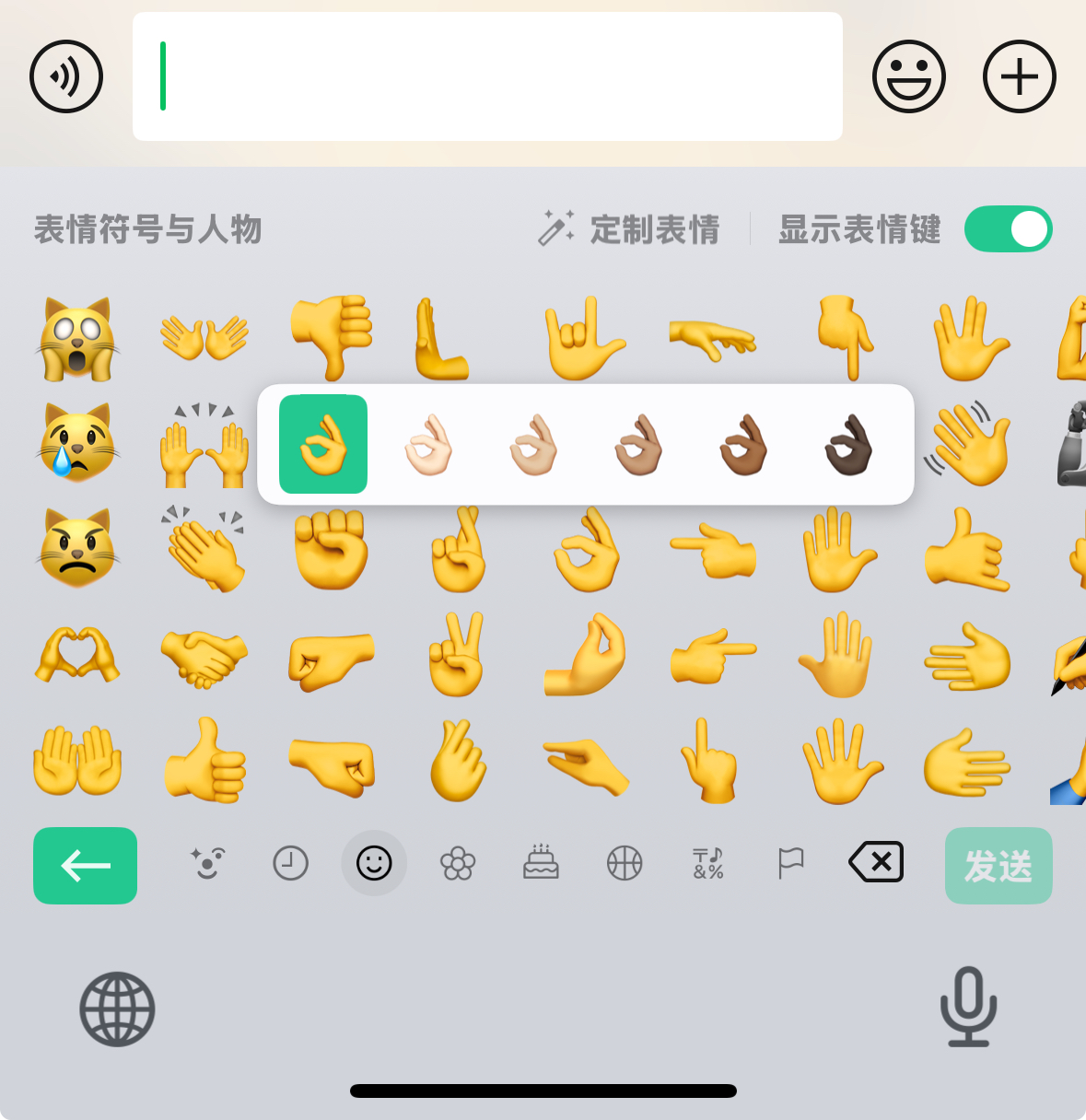
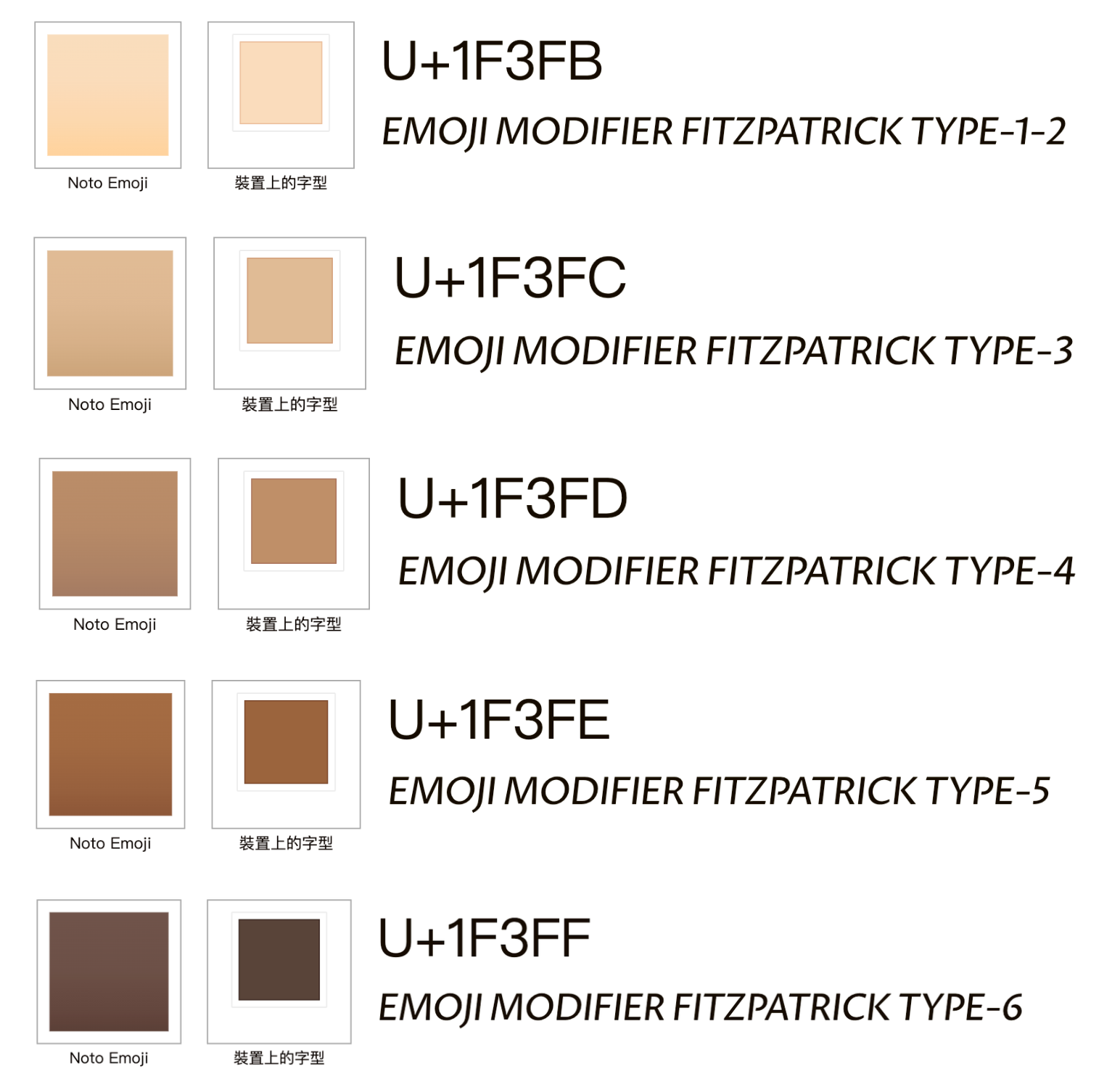
How do skin tones work? There’s something called a “skin tone modifier”, which comes in several variants. Append one after the code units of a person or hand-gesture emoji, and it renders with a different skin tone.
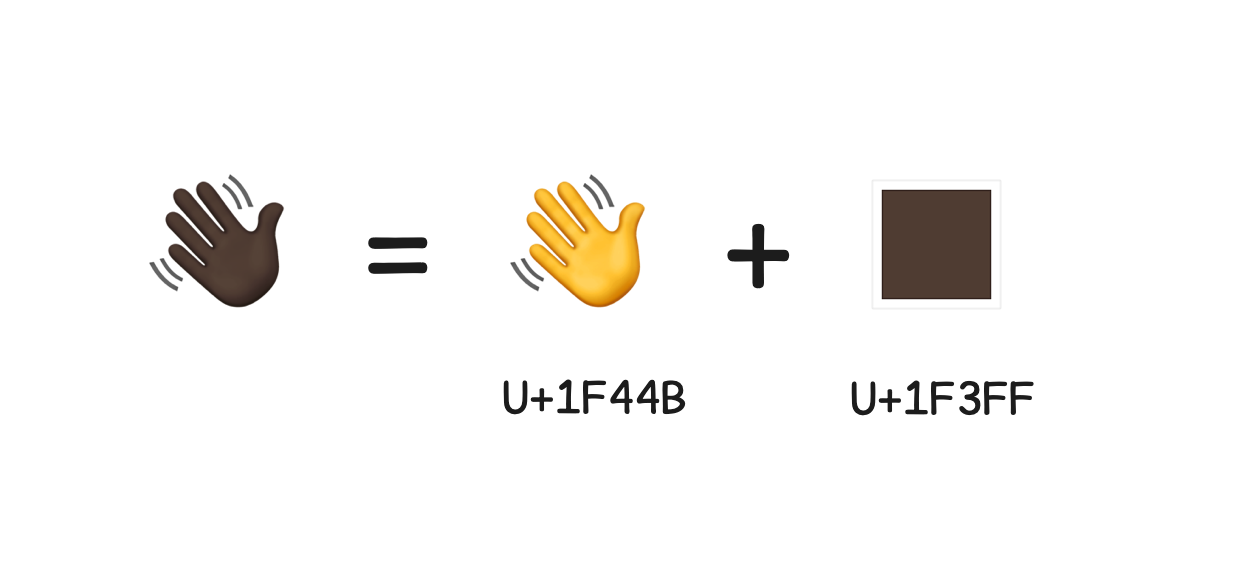
For example, the ”👋” (waving hand) emoji can become hands of different colors by adding a skin tone modifier, like 👋🏻👋🏽👋🏾👋🏿
Looking it up, the code point of 👋 is U+1F44B
All the other colored hands are 2 code points, as shown below:
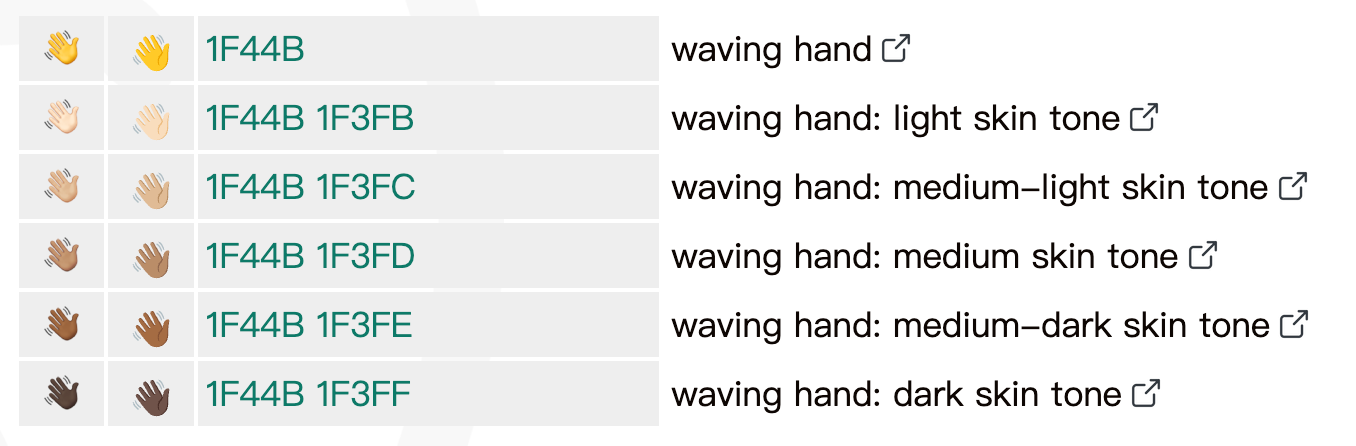
So appending a skin tone modifier to a base emoji changes its skin tone.
These are the main skin tone modifiers. Without a modifier, you get the default yellow.
Variation selectors
Have you ever seen this in some odd app, or when sending messages across platforms? You meant to send your girlfriend a red heart ♥️, and it arrived as a black ♥. Why?
Let’s look at their code points:
| Character | Code point |
|---|---|
| ♥ | U+2665 |
| ♥️ | U+2665 U+FE0F |
It turns out the black heart is a character that has existed for a long time. From U+2665 alone you can tell it’s in the basic plane.
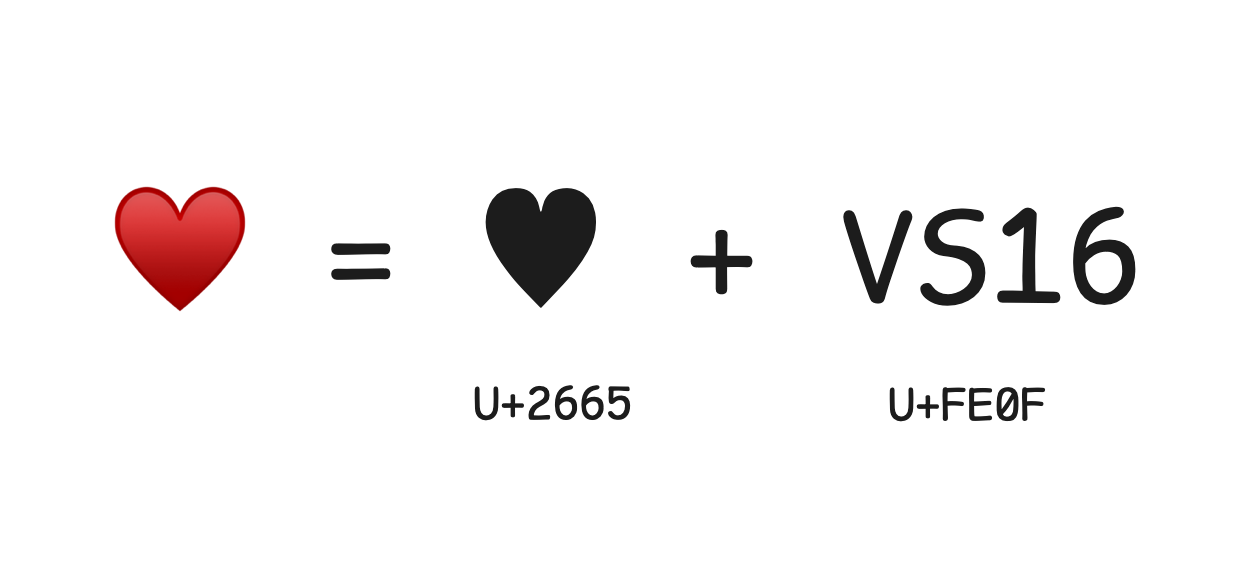
My guess is that once the red heart emoji came along, they appended a U+FE0F to indicate it should be displayed in color. This is probably a leftover from history. Here’s an explanation from another source:
As computing evolved, people wanted more variety in how characters are displayed. The same character might have several presentation styles; an emoji, for example, might be shown as a color image or as monochrome text. To support this, Unicode introduced variation selectors: by appending a specific variation selector after a base character, you tell software which style to render it in.
In the Unicode basic plane, characters from 0xFE00 to 0xFE0F are all Variation Selectors, and U+FE0F is designated to indicate that a base glyph should be displayed as a color emoji.
Characters in emoji presentation are usually in color, while characters in text presentation are black and white. To specify the presentation style explicitly, U+FE0E marks that the character should be shown in text style, and U+FE0F marks that it should be shown in emoji style.
What are some other examples of variation selectors?
| Base character | Code point | With variation selector | Code point |
|---|---|---|---|
| ☀ | U+2600 | ☀️ | U+2600 U+FE0F |
| ♠ | U+2660 | ♠️️ | U+2660 U+FE0F |
| ⬆ | U+2B06 | ⬆️️️ | U+2B06 U+FE0F |
| ☑ | U+2611 | ️ ☑️️️ | U+2611 U+FE0F |
Keycap sequences
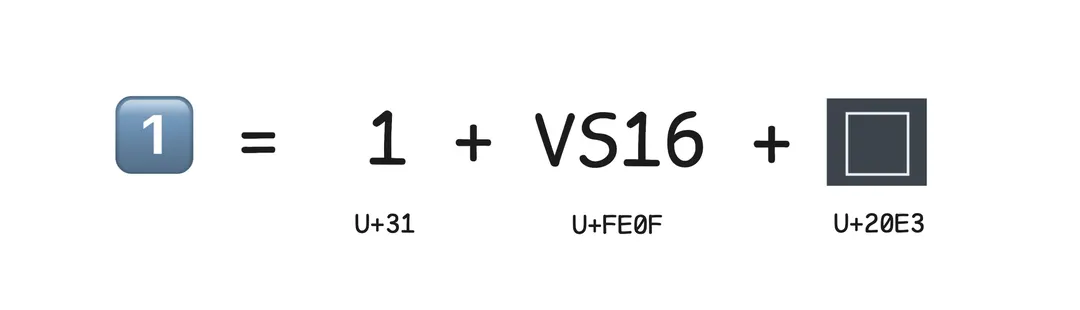
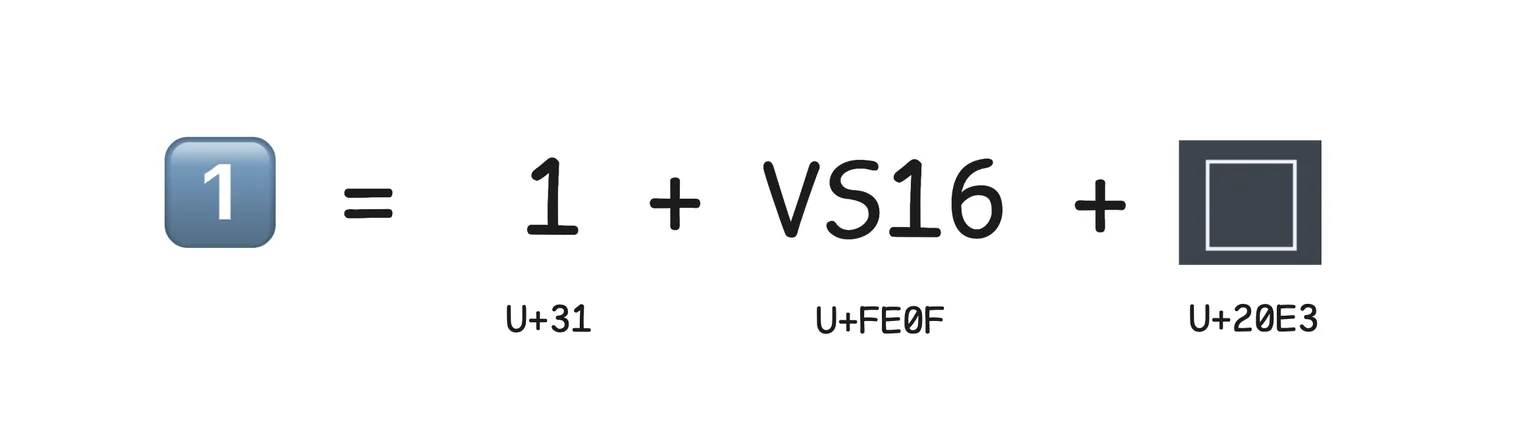
The keycap emoji we use all the time, like 1️⃣ 2️⃣ 3️⃣, belong to this family. Each one is made of a base code point + a variation selector + an enclosing keycap code point.
Flag sequences
Flag emoji work a little differently, but the rule is still simple: a flag is usually made of two regional indicator letters. For example, ”🇨🇳” is the Chinese flag, and it’s actually the letters C + N (two code points) combined.
| Part 1 | Code point | Part 2 | Code point | Combined | Code point |
|---|---|---|---|---|---|
| 🇨 | U+1F1E8 | 🇳 | U+1F1F3 | 🇨🇳 | U+1F1E8 U+1F1F3 |
| 🇯 | U+1F1EF | 🇵 | U+1F1F5 | 🇯🇵 | U+1F1EF U+1F1F5 |
| 🇺 | U+1F1FA | 🇸 | U+1F1F8 | 🇺🇸 | U+1F1FA U+1F1F8 |
| 🇬 | U+1F1EC | 🇧 | U+1F1E7 | 🇬🇧 | U+1F1EC U+1F1E7 |
| 🇧 | U+1F1E7 | 🇷 | U+1F1F7 | 🇧🇷 | U+1F1E7 U+1F1F7 |
Joiner sequences
The patterns above can all be thought of as “modifiers”. Emoji also have a much bigger way to extend themselves: several independent emoji can be joined together to express a more complex idea. This is done with the Zero Width Joiner (ZWJ).
The zero width joiner’s code point is U+200D. As the name suggests, it’s a “zero-width” character. It doesn’t render anything itself, but it glues the emoji on either side into a new visual unit.
For brevity, I’ll call the zero width joiner ZWJ from here on
Professions
The simplest example is profession emoji. For example, 👨🔬 (man scientist) is 👨 (man) combined with 🔬 (microscope):
| Part | Description | Code point |
|---|---|---|
| 👨 | Man | U+1F468 |
| | Zero width joiner | U+200D |
| 🔬 | Microscope | U+1F52C |
More examples:
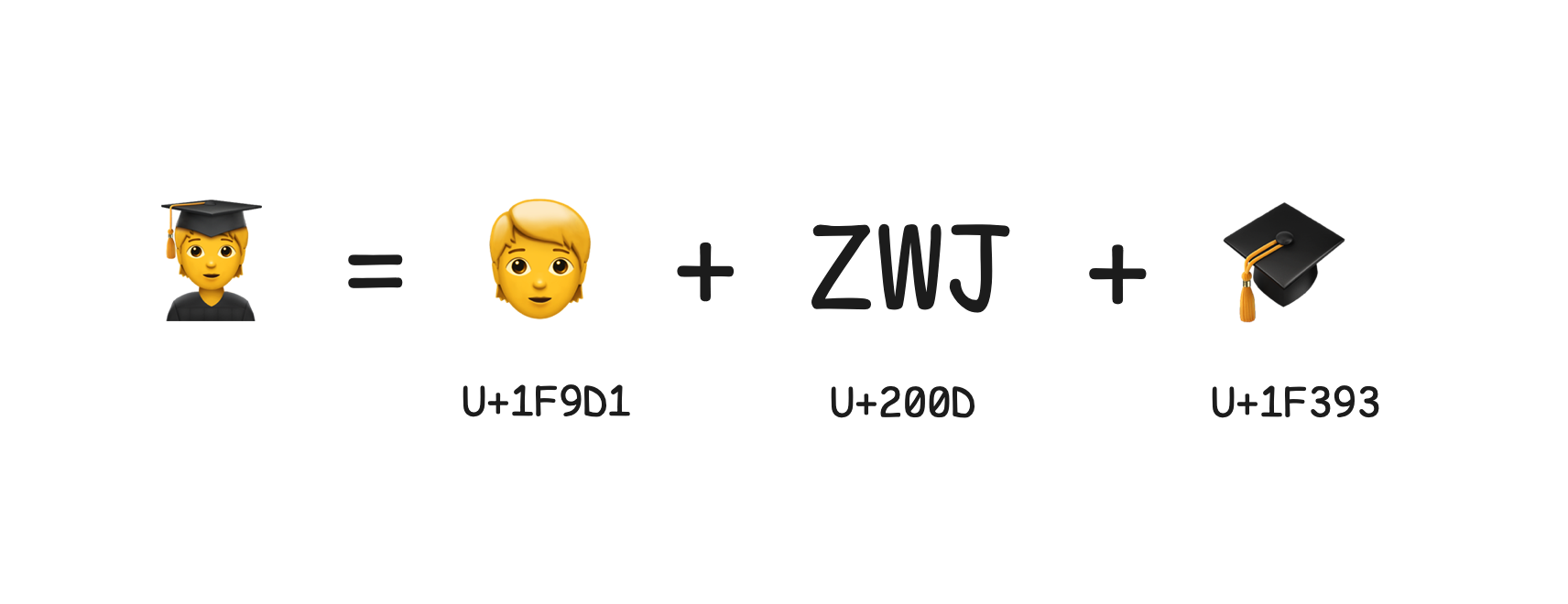
👨🔬 = 👨 + ZWJ + 🔬 // scientist
🧑💻 = 🧑 + ZWJ + 💻 // programmerAction + gender
Some emoji combine with gender symbols, like “♂️” (male sign) and “♀️” (female sign), to form new symbols. For example, 🙋♀️ (woman raising hand) is 🙋 (happy person raising hand) joined with ♀ via a ZWJ. On emojipedia we can see its code point sequence:
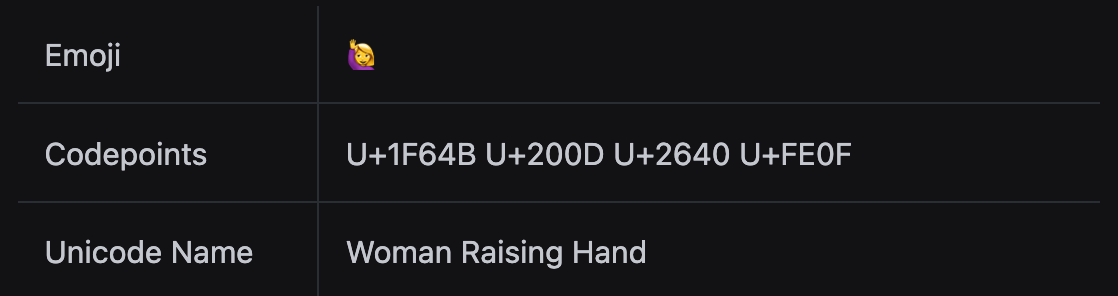
🙋♀️ = 🙋 + ZWJ + ♀ + 0xFE0F // woman raising handFamilies
For example, 👨👩👧👦 (family of four) is actually 4 separate emoji joined by 3 zero width joiners:
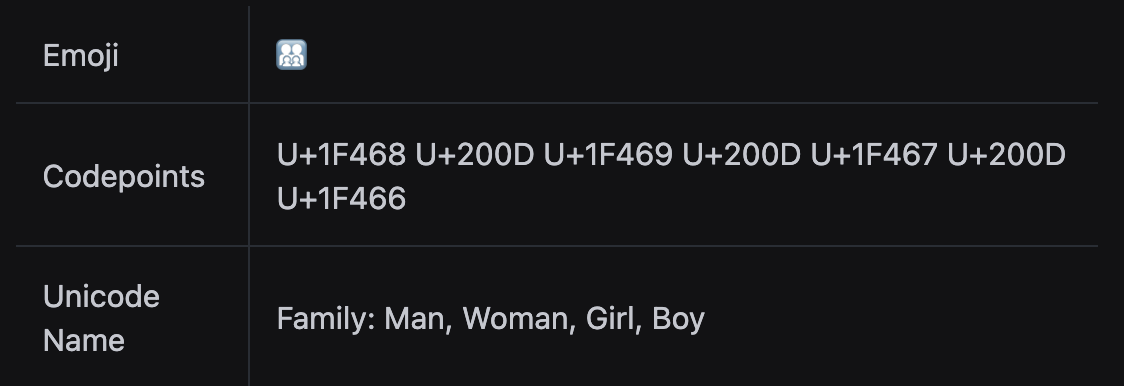
👨👩👧👦 = 👨 + ZWJ + 👩 + ZWJ + 👧 + ZWJ + 👦Let’s break down its code points:
| Part | Description | Code point |
|---|---|---|
| 👨 | Man | U+1F468 |
| | ZWJ | U+200D |
| 👩 | Woman | U+1F469 |
| | ZWJ | U+200D |
| 👧 | Girl | U+1F467 |
| | ZWJ | U+200D |
| 👦 | Boy | U+1F466 |
Now we can answer the question from the previous part: why is "👨👩👧👦".length = 11?
Because this simple-looking family emoji is actually made of 7 code points. The 3 zero width joiners take 1 code unit each, and the people are all in supplementary planes, so each needs two code units. That gives a length of 8 + 3 = 11.
Complex sequences: skin tone + gender + profession + joiner
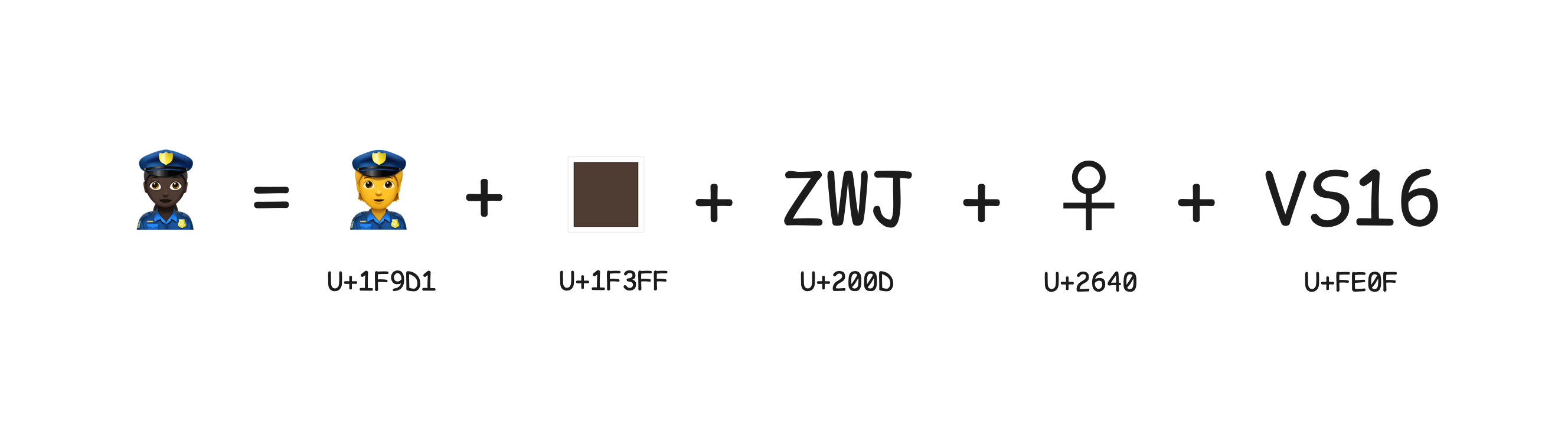
Mix all of the patterns above together and you get complex sequences. For example, the woman police officer with dark skin tone 👮🏿♀️ is made of these elements:
Broken down:
| Part | Description | Code point |
|---|---|---|
| 👮 | Police officer | U+1F46E |
| 🏿 | Dark skin tone modifier | U+1F3FF |
| | Zero width joiner | U+200D |
| ♀ | Female sign | U+2640 |
| ️ | Variation selector | U+FE0F |
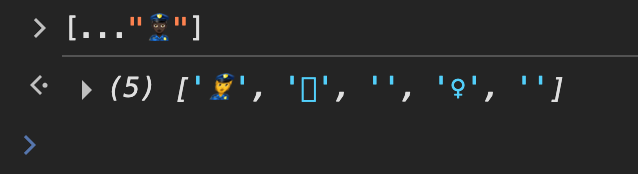
We can run a little experiment here. My guess is that the spread operator handles surrogate pairs specially, but doesn’t handle these combined sequences well.
Other fun combinations
Rainbow flag 🏳️🌈: a white flag combined with a rainbow
🏳️🌈 = 🏳️ + U+200D + 🌈Heart with arrow 💘: a heart combined with an arrow
💘 = ❤️ + U+200D + 🏹Woman and woman kissing
👩❤️💋👩 = 👩 + U+200D + ❤️ + U+200D + 💋 + U+200D + 👩Two women with darker skin tones kissing
👩🏽❤️💋👩🏽 U+1F469 U+1F3FD U+200D U+2764 U+FE0F U+200D U+1F48B U+200D U+1F469 U+1F3FDDifferent skin tones on each side
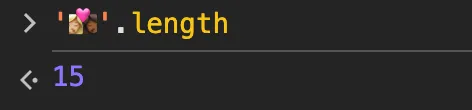
👩🏼❤️💋👩🏾' U+1F469 U+1F3FC U+200D U+2764 U+FE0F U+200D U+1F48B U+200D U+1F469 U+1F3FEIf you’re curious, try working out the length of that last one, the two women with different skin tones kissing. Ha.
With all these combinations, how do we handle them?
These patterns make emoji far more expressive, but they also make string handling harder. If you split a string containing emoji, compute its length, or take a substring without accounting for these structures, you can easily run into problems:
- Split the text for a character-by-character fade-in animation, and garbled question marks show up
- If the string travels between the backend and the frontend, the two sides may compute different lengths
- Where you need a character count, using length directly gives the wrong answer
For example, you can probably guess what happens when we split a family emoji:

Someone says: can’t I just use the spread operator? Let’s see:
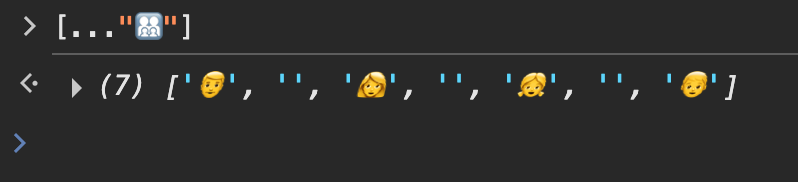
To be fair, it does split things better than split, it just breaks the family apart 😏
Because JS string methods (like String.prototype.charAt() or String.prototype.substring()) and the length property all work on UTF-16 code units, they all run into this problem with emoji and other characters outside the basic plane.
So we need a solid solution that can “correctly identify each Unicode unit” for us.
3 Reading the runes.js source
runes is a JavaScript library for splitting strings that contain emoji and other Unicode characters. In JavaScript, the default String.split('') can’t correctly handle emoji and other non-BMP (Basic Multilingual Plane) characters, and runes solves that.
It’s a fairly small utility library, just one file exporting two functions, runes and substr. Its handling of emoji ties in closely with the Unicode principles and encoding details covered above, and it gives frontend developers a reliable way to work with emoji strings.
First, the results:
const runes = require('runes')
// Standard String.split
'♥️'.split('') => ['♥', '️']
'Emoji 🤖'.split('') => ['E', 'm', 'o', 'j', 'i', ' ', '�', '�']
'👩👩👧👦'.split('') => ['�', '�', '', '�', '�', '', '�', '�', '', '�', '�']
// ES6 string iterator
[...'♥️'] => [ '♥', '️' ]
[...'Emoji 🤖'] => [ 'E', 'm', 'o', 'j', 'i', ' ', '🤖' ]
[...'👩👩👧👦'] => [ '👩', '', '👩', '', '👧', '', '👦' ]
// Runes
runes('♥️') => ['♥️']
runes('Emoji 🤖') => ['E', 'm', 'o', 'j', 'i', ' ', '🤖']
runes('👩👩👧👦') => ['👩👩👧👦']The core functions
The library mainly exports two utility functions: runes, which replaces the built-in split, and substr, which takes substrings correctly.
As you’d expect, the core is runes. Once you can correctly split a string into an array, taking a substring is just a matter of splicing the array and joining it back together.
So let’s focus on how runes is implemented:
function runes(string) {
  // Input check
  if (typeof string !== 'string') {
    throw new Error('string cannot be undefined or null')
  }

  const result = []
  let i = 0
  let increment = 0

  while (i < string.length) {
    // Determine how many code units the current character is made of
    increment += nextUnits(i + increment, string)

    // Some special characters, e.g. romanization marks
    if (isGraphem(string[i + increment])) {
      increment++
    }
    // If it's a variation selector, move the cursor forward by one
    if (isVariationSelector(string[i + increment])) {
      increment++
    }
    // If it's a modifier such as an enclosing keycap, move the cursor forward by one
    if (isDiacriticalMark(string[i + increment])) {
      increment++
    }
    // If it's a zero width joiner, don't push yet; keep looking ahead
    if (isZeroWidthJoiner(string[i + increment])) {
      increment++
      continue
    }

    // Reaching here means we've extracted one complete character
    result.push(string.substring(i, i + increment))
    i += increment
    increment = 0
  }

  return result
}
As you can see:
- The
nextUnitsfunction decides how many code units the current character is made of - Then it checks for joiners and modifiers
- If it’s a modifier like a variation selector, it skips ahead one unit
- If it’s a ZWJ, the part that follows has to go through the whole process again
Now let’s look at nextUnits, which decides how many code units the current character is made of:
- Basic Multilingual Plane (BMP) characters: 1 code unit
- Characters represented by a surrogate pair: 2 code units
- Emoji with a skin tone modifier: 4 code units
- Flag emoji: 4 code units
function nextUnits(i, string) {
  const current = string[i]

  // If it's not the start of a surrogate pair, or we've hit the end of the string, take just one code unit
  if (!isFirstOfSurrogatePair(current) || i === string.length - 1) {
    return 1
  }

  const currentPair = current + string[i + 1]
  let nextPair = string.substring(i + 2, i + 5)

  // If it's a flag sequence, that's two code points (four code units)
  if (isRegionalIndicator(currentPair) && isRegionalIndicator(nextPair)) {
    return 4
  }

  // The skin tone modifier is itself a non-BMP code point (so it takes 2 code units); with the skin tone that makes 4 code units
  if (isFitzpatrickModifier(nextPair)) {
    return 4
  }

  // A regular surrogate pair
  return 2
}
A quick explanation of the helper functions. They’re short, so I won’t paste the code:
isFirstOfSurrogatePairchecks whether current is a high surrogate. If not, it’s a basic-plane character and needs no special handlingisRegionalIndicatorchecks whether both the current pair and the next pair fall within the flag code point range, i.e.0x1f1e6to0x1f1ffisVariationSelectorchecks whether the current code unit is in the0xfe00to0xfe0frangeisZeroWidthJoinerchecks whether the current code point is0x200DisFitzpatrickModifierchecks for a skin tone modifier; there are only five,0x1f3fbto0x1f3ff
4 Summary
In this post we took a deep look at how emoji work and how to handle them in frontend development. We started with the basics of Unicode encoding, including Code Points and Code Units, and how UTF-16 uses Surrogate Pairs to represent characters outside the basic plane.
We walked through several common emoji composition patterns:
- Basic single-code-point emoji
- Emoji with skin tone modifiers
- Symbols displayed in color using variation selectors
- Flag sequences (made of two regional indicators)
- Compound emoji joined with the Zero Width Joiner (ZWJ), such as families and professions
These compositions make emoji much more expressive, but they also make string handling in JavaScript harder. Because JavaScript string operations are based on UTF-16 code units rather than Unicode characters, native methods like String.split('') or .length misbehave on strings containing emoji.
Finally, we went through the source of the runes.js library. By understanding Unicode encoding rules and the various emoji composition patterns, this small library provides runes() and substr(), which correctly split and take substrings of strings containing complex emoji. Its core logic identifies the boundaries of each Unicode character, making sure an emoji and its modifiers are treated as a single, complete unit.
By using runes.js, or understanding the principles behind it, we can correctly display, measure and manipulate strings containing emoji in frontend code, avoid garbled text and wrong length calculations, and deliver a better user experience.
5 Functions & tools
Look up emoji and their code points: emojipedia
Look up a character by code point: Compart Unicode
Look up a character by code point: Zihi (zihi.com)
Get the code unit at a given position in a String: String.charCodeAt
Get the code point at a given position in a String: String.codePointAt
Build a string from a sequence of code points: String.fromCodePoint
Build a string from a sequence of code units: String.fromCharCode