A New Less Release Broke Tailwind's @apply, and Tailwind Took the Blame
Background
One of our large projects uses a micro-frontend architecture. The stack is SSR + Vue 3 + NestJS + Webpack4, the style preprocessor is Less, and the project also integrates Tailwind, which most of us use day to day to write styles quickly.
Tailwind provides a bit of syntactic sugar called @apply that saves us some repetitive code.
For example, in a Vue template we can write:
<template>
    <p class="font-bold text-[12px] text-gray-800 mb-4 p-1">Johnson</p>
</template>
The PM asks for a few more names, so you copy a few more lines:
<template>
    <p class="font-bold text-[12px] text-gray-800 mb-4 p-1">Johnson</p>
    <p class="font-bold text-[12px] text-gray-800 mb-4 p-1">Rory</p>
    <p class="font-bold text-[12px] text-gray-800 mb-4 p-1">Jenifer</p>
    <p class="font-bold text-[12px] text-gray-800 mb-4 p-1">Sam</p>
</template>
Now what? That’s a bit repetitive. Tailwind offers @apply, which lets you pull a fixed set of utilities into a single class:
<template>
    <p class="person-name">Johnson</p>
    <p class="person-name">Rory</p>
    <p class="person-name">Jenifer</p>
    <p class="person-name">Sam</p>
</template>
<style scoped lang="css">
.person-name {
    @apply font-bold text-[12px] text-gray-800 mb-4 p-1;
}
</style>
The Problem: Tailwind’s @apply Stops Working
Recently a teammate asked: has anyone changed the Tailwind config? Every @apply now throws an error. What’s going on?
Here’s the error. It breaks the build and the component fails to render:
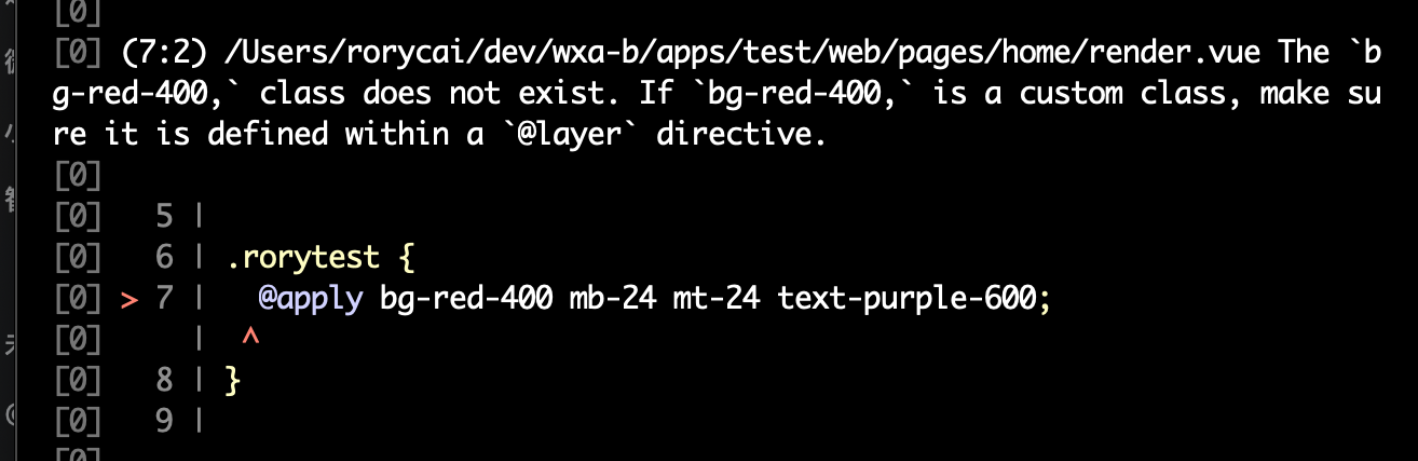
The moment I saw it, a bunch of possible suspects flashed through my head:
- This is a micro-frontend monorepo. Is one sub-app broken, or all of them?
- Integrating Tailwind relies on two key config files,
tailwind.config.jsandpostcss.config.js. Has anyone changed them recently? - Tailwind also needs
@tailwind utilitiesin the project’s global/shared CSS before its preset utility classes are available. Could that import be missing? - Judging from the error message, Tailwind no longer recognizes
bg-red-400. Could something be missing, so Tailwind can’t find the rules behind those presets while processing?
These are all hypotheses. Let’s confirm or rule them out one at a time.
First Pass: Scope, Config, Recent Changes
First, I tested other sub-apps in the same micro-frontend monorepo, including a business sub-app and a clean test sub-app. Both reproduced the problem 100% of the time, so it’s not one sub-app’s problem but something shared by all of them.
Second, I checked whether the config files had changed. Using git log --since, I pulled files changed in the past 10 days whose names contained tailwind/postcss. Only one sub-app, livemanage, had changes, and those were two freshly initialized configs, which couldn’t cause a problem this widespread. So config changes are basically ruled out.

The third point was easy to check: every sub-module’s shared style file common.less includes @tailwind utilities, so that’s ruled out too.
As for the fourth: could Tailwind have gone haywire and suddenly stopped recognizing shorthands like mb-12? In other words, could Tailwind be at fault?
First, let’s look at the error again:
The 'xxx' class does not exist. If 'xxx' is a custom class, make sure it is defined within a '@layer' directive.
We know @layer is a Tailwind feature for organizing preset style shortcuts, so this message looks like it comes from Tailwind, which means Tailwind does get its hands on this stylesheet during processing.
We also noticed that if @apply is followed by a single rule instead of several, there’s no error. Something like this:
.myClass {
    @apply mb-2; // this works
    @apply mb-2 mx-1 bg-blue-100; // multiple in a row breaks
}
That further shows Tailwind is processing the file, and it does recognize utility classes like mb-2, so missing utility classes aren’t the issue either. It’s more likely that something goes wrong when Tailwind extracts/parses/splits the @apply statement.
Narrowing It Down: Is Tailwind to Blame?
However fancy a stylesheet is, the final output is just CSS. For Tailwind to offer syntactic sugar that browsers don’t support natively, it has to process/convert all of that sugar into something browsers understand before the final CSS is produced. As shown below, mb-24 has to become margin-bottom: 6em;, and so on.

So which tool in the frontend toolchain makes it easy to process/transform CSS? PostCSS, of course. And Tailwind does in fact use a PostCSS plugin to provide its core functionality.
So what we need to look at is how Tailwind performs its style replacement on top of PostCSS. In practice there’s a very convenient trick: search for the static part of the error message.
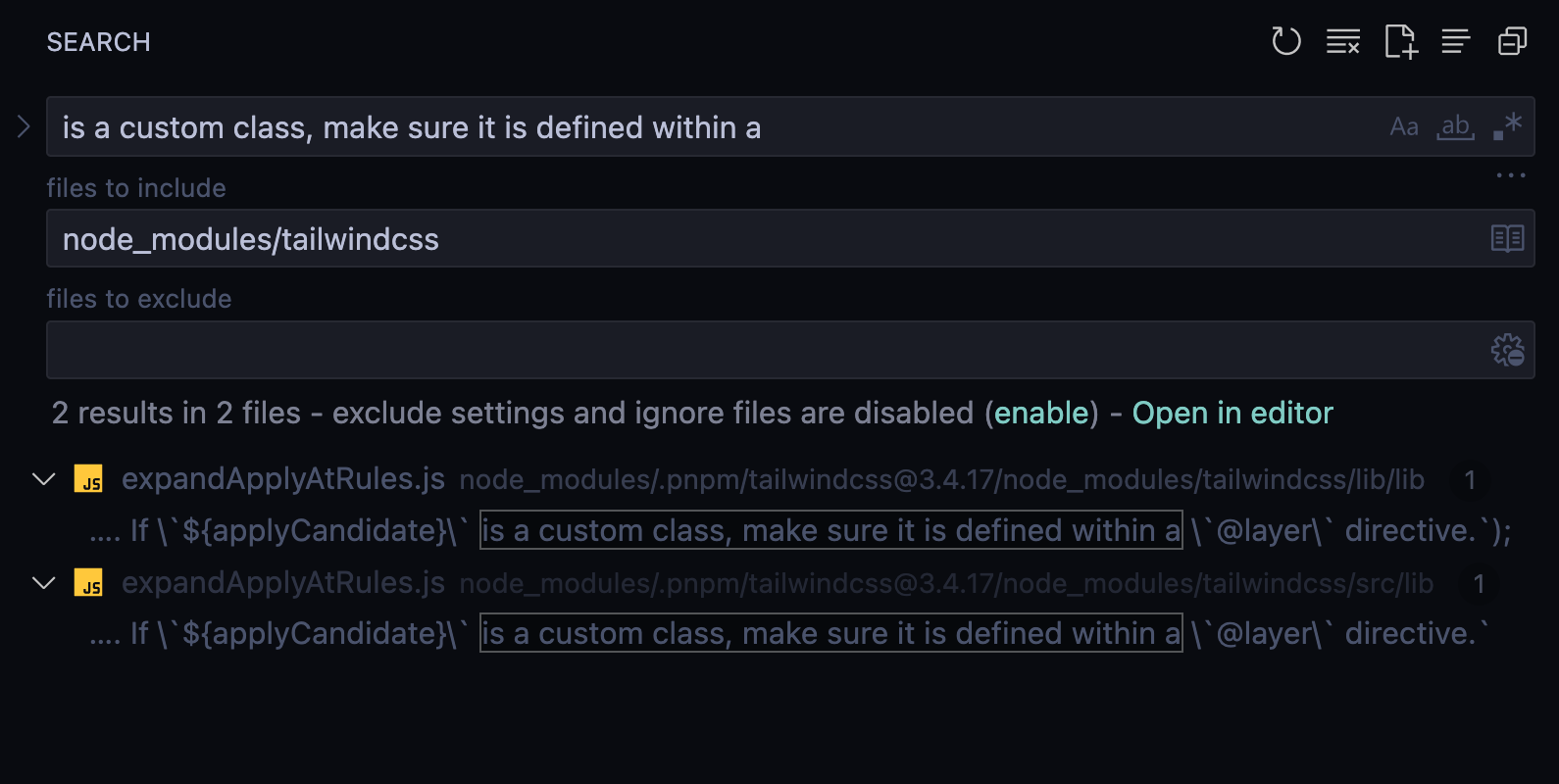
That turns up the code below (irrelevant logic omitted). Tailwind uses PostCSS’s walk capability: for every @apply, it calls extractApplyCandidates to pull out all the utility classes, and if an extracted class isn’t in applyClassCache (i.e. Tailwind doesn’t recognize it), it throws this error.
function processApply(root, context, localCache) {
    let applyCandidates = new Set();

    // Collect all @apply rules and candidates
    let applies = [];
    root.walkAtRules('apply', (rule) => {
        // ...
        applies.push(rule);
    });

    let applyClassCache = combineCaches([
        localCache,
        buildApplyCache(applyCandidates, context),
    ]);
    for (let apply of applies) {
        // ...
        let [applyCandidates, important] = extractApplyCandidates(apply.params);
        // ...
        for (let applyCandidate of applyCandidates) {
            // ...
            if (!applyClassCache.has(applyCandidate)) {
                throw apply.error(
                    `The \`${applyCandidate}\` class does not exist. If \`${applyCandidate}\` is a custom class, make sure it is defined within a \`@layer\` directive.`
                );
            }
            let rules = applyClassCache.get(applyCandidate);
            // ...
            candidates.push([applyCandidate, important, rules]);
        }
    }
    // ...
}
Nothing looks wrong here. Could the extraction function be the problem? Let’s look at it:
function extractApplyCandidates(params) {
  let candidates = params.split(/[\s\t\n]+/g)
  if (candidates[candidates.length - 1] === '!important') {
    return [candidates.slice(0, -1), true]
  }
  return [candidates, false]
}
This looks fine too. If an apply has several rules in a row, it splits them on spaces/tabs/newlines and drops a trailing !important if present.
For example, for @apply mb-2 pb-3, the extracted applyCandidates should be ['mb-2', 'pb-3'].
Strange. So I added a print statement to see what applyCandidates actually looks like:
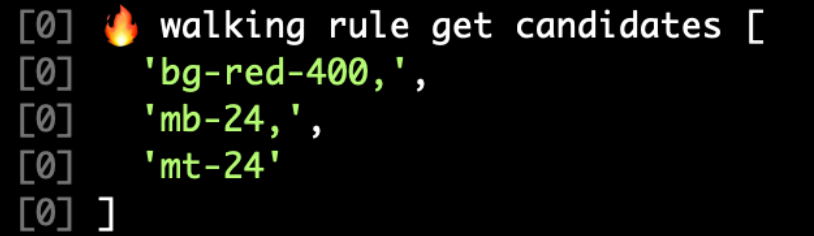
That’s weird. Why are there commas???

Is Tailwind doing something sneaky? Let me print the input:
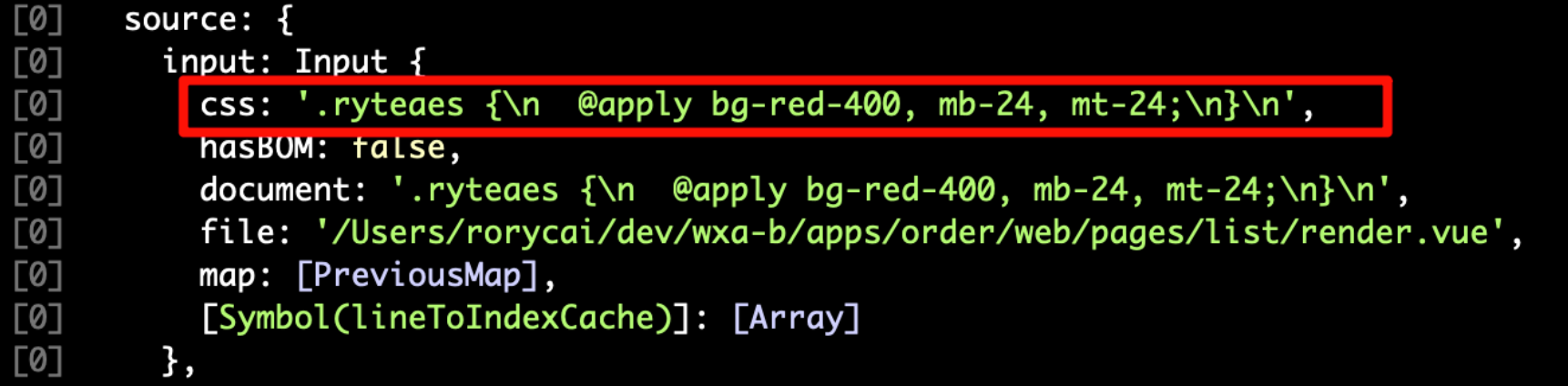
What?? The commas are already there when Tailwind gets it?? Looks like this isn’t so simple after all.

Going Deeper: Tracing the Webpack Loaders
I’d tried to pin this on Tailwind, but it turned out that to get an answer I had to figure out this question:
From the moment we write the <style scoped lang="less"> block in a .vue single-file component (SFC from here on) to the moment those styles run in the browser, how many processing steps does it go through, and what are the intermediate outputs?
Some background: our stack is SSR + Vue3 + Nest.js + Webpack4, so asset processing and bundling are mostly governed by the Webpack config.
If you’re familiar with Webpack, you’ll know that Webpack4 only natively parses/processes standard JavaScript; everything else relies on third-party loaders. So the loader config is what we care about.
You can read it straight from the project config, which is usually provided either as a chainWebpack function or as a static webpack.config.js.
We took the simplest, most direct route: edit the doBuild function in node_modules/webpack/lib/NormalModule.js and print the names of the loaders in the chain being executed:
You can add custom conditions to filter the debug output, e.g. only print when the resource name matches your test component. Otherwise you’ll drown in logs.
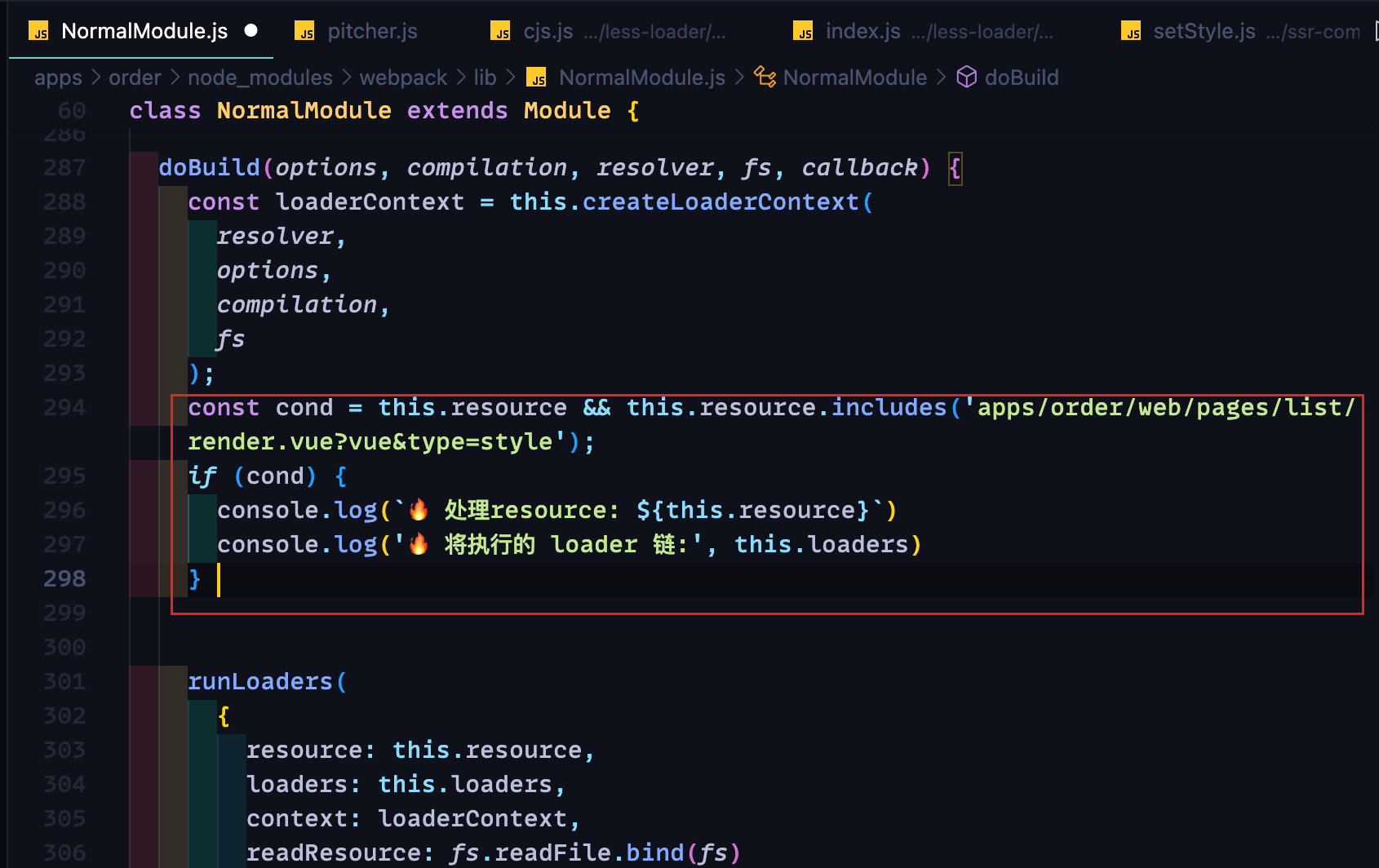
The printed loader chain, simplified:
🔥 Processing resource: .../pages/list/render.vue?vue&type=style&index=0&id=5017db43&lang=less&scoped=true
🔥 Loader chain to run: [
    "node_modules/ssr-mini-css-extract-plugin/dist/loader.js",
    "node_modules/css-loader/dist/cjs.js",
    "node_modules/vue-loader/dist/stylePostLoader.js",
    "node_modules/postcss-loader/dist/cjs.js",
    "node_modules/less-loader/dist/cjs.js",
    "node_modules/vue-loader/dist/index.js"
]
Huh? What’s that long resource string?
When Webpack sees that we import a render.vue file, it first runs vue-loader to split it into three parts (template, script, style), and then Webpack requests each of them again:
- Template:
render.vue?vue&type=template&id=123 - Script:
render.vue?vue&type=script&id=123 - Style:
render.vue?vue&type=style&id=123&scoped=true&lang=less
In short, for the style part the loader chain is:
[
    "ssr-mini-css-extract-plugin/dist/loader",
    "css-loader",
    "vue-loader/dist/stylePostLoader",
    "postcss-loader",
    "less-loader",
    "vue-loader"
]
For the template, the loader chain is:
["babel-loader", "template-loader", "vue-loader"]For the script, the loader chain is:
["babel-loader", "vue-loader"]Normally, loaders first run in order (the pitch phase) and then in reverse order (the normal phase). That doesn’t matter for this discussion, so we can simply think of them as running in reverse order.
We care about the style part. This module request first hits vue-loader, which then hands off to the rest of the loader chain in this order:
- less-loader: a thin wrapper around Less. At its core it calls
less.render()on the incoming Less code, mainly converting Less syntax (nesting, variables, etc.) into standard CSS - postcss-loader: many plugins process the CSS here. Tailwind’s expansion and injection, and autoprefixer’s vendor prefixes, all happen at this stage
- stylePostLoader: a loader injected by VueLoaderPlugin. If your style is scoped, it goes through this loader, which mainly handles style isolation. We can ignore it
- css-loader: mainly resolves
@import()andurl()in CSS. We can ignore it for now - ssr-mini-css-extract-plugin/loader: mainly extracts CSS into separate files. Unrelated to our problem, so ignore it for now
After all these steps, the output should be a standalone CSS file that’s referenced from the HTML via a link tag.
Looking at this pipeline, the most likely culprits are clearly less-loader and postcss-loader. We can just edit their source directly and print their inputs and outputs.
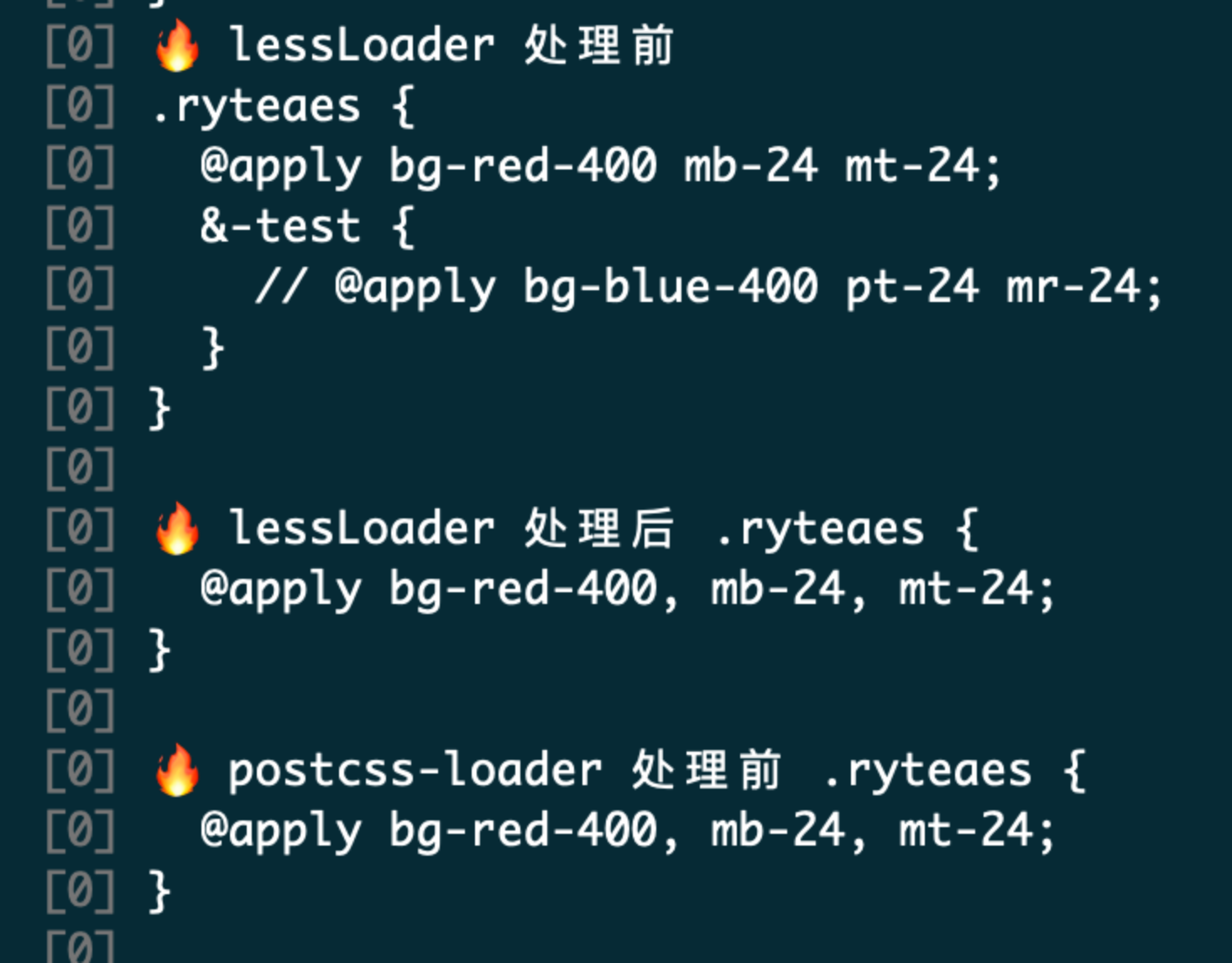
Looks like we found the culprit: less-loader.
Let’s do a quick check by changing the Vue component’s style lang from less to css. The loader chain is now:
[
    "ssr-mini-css-extract-plugin/dist/loader",
    "css-loader",
    "vue-loader/dist/stylePostLoader",
    "postcss-loader",
    "vue-loader"
]
Without less-loader in the chain, everything works as expected.
<!-- Switching to CSS makes the error go away -->
<style scoped lang="css">
.ryteaes {
    @apply bg-red-400 mb-24 mt-24;
}
</style>
At this point less-loader wants a word:
Not my fault! Go read my code. I’m just a wrapper. It’s Less’s problem!
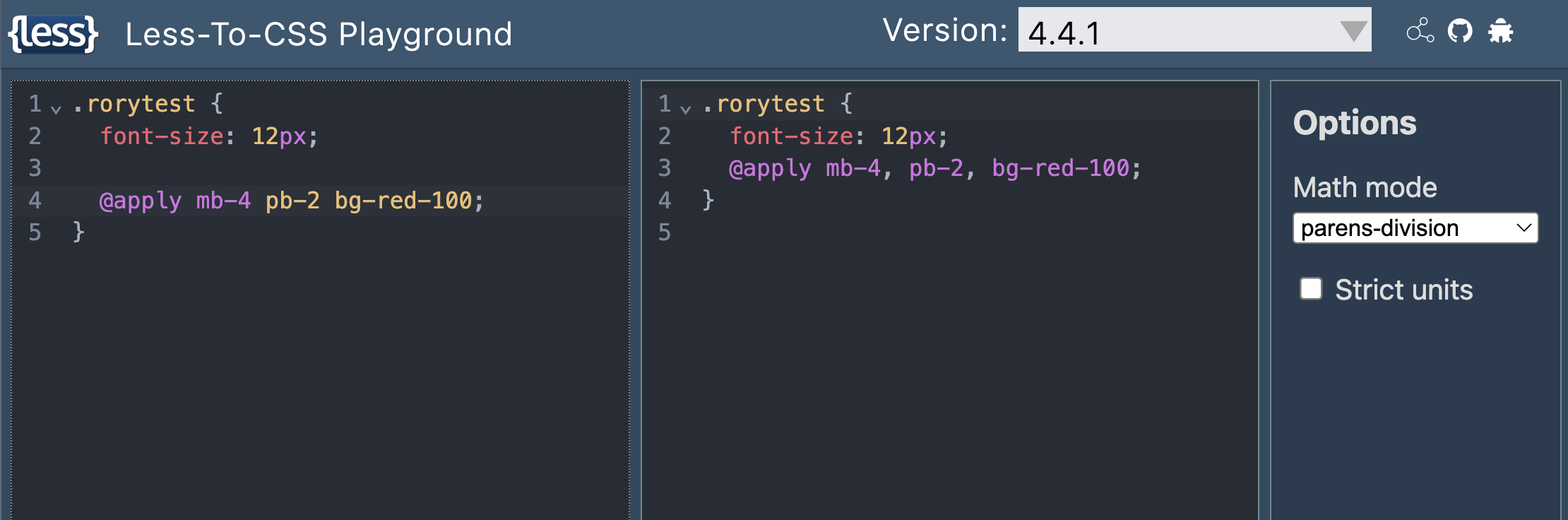
Fine. It really is Less’s problem.
(Who knew… I never suspected Less. If only I’d tried the Less Playground earlier.)
Root Cause
So here’s the root cause:
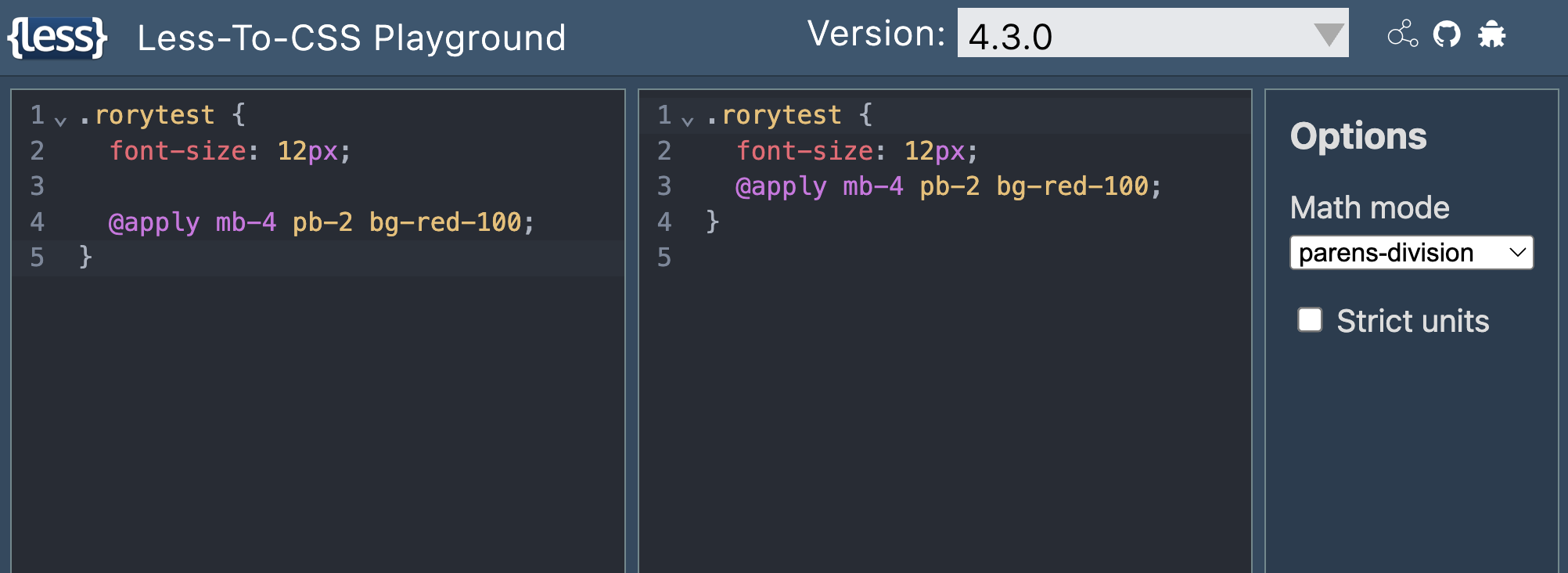
The Less preprocessor inserts an inexplicable comma between each keyword after @apply. When Tailwind’s PostCSS plugin picks things up in the next step and splits on spaces/newlines, every utility class except the last ends up with a trailing comma (e.g. mb-4,). Tailwind can’t find a mapping for them, so it can’t do the replacement and injection, and it throws right in Webpack’s postcss-loader step. Module compilation can’t continue, and development grinds to a halt.
Why Did It Work Before?
One more question: the project has plenty of @apply statements followed by multiple rules. Why were they fine before, and only broke recently?
Experience says that changes are usually the root of problems. Something must have changed.
I opened the Less source repo. The code that handles @ rules lives in packages/less/src/less/tree/atrule.js.
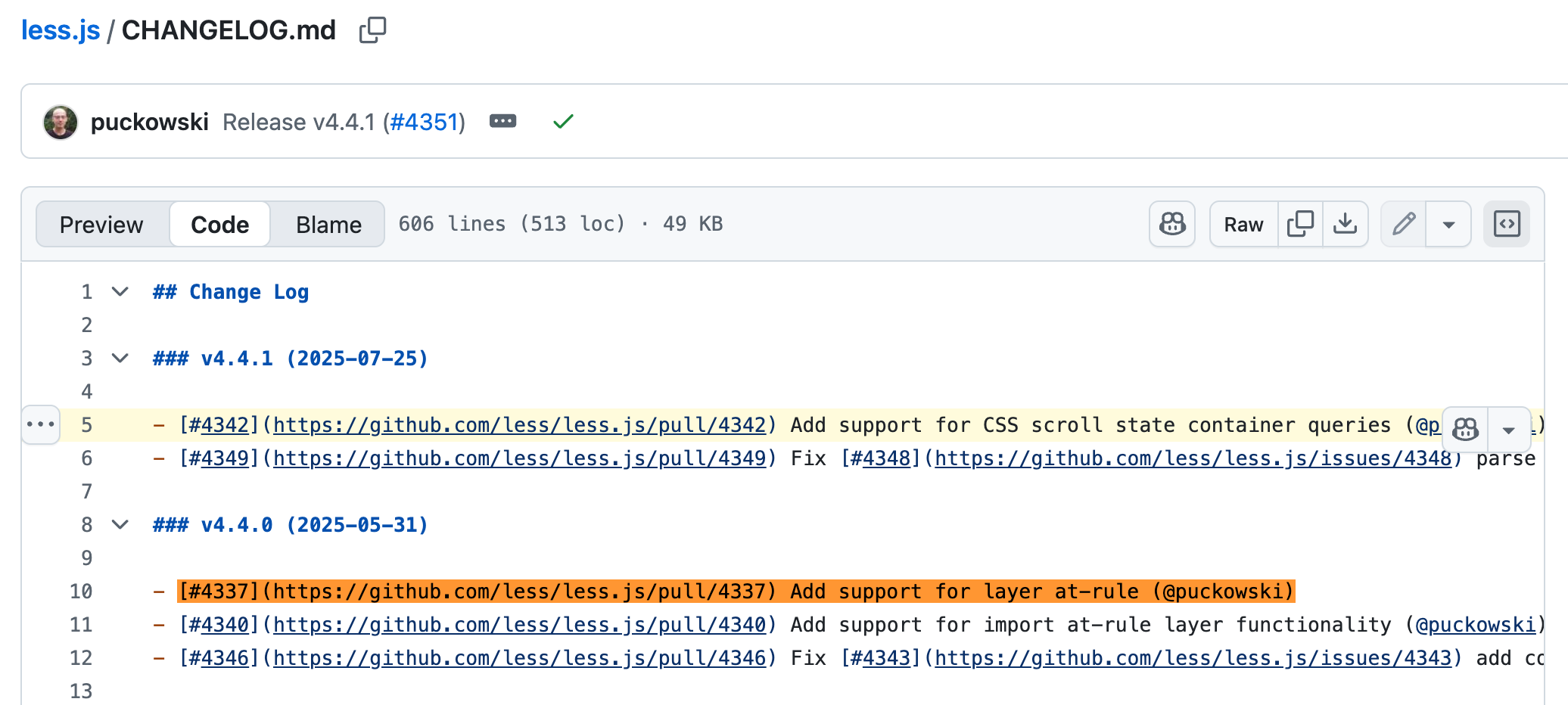
Five months ago, there was a suspicious change here: fix(issue#4242): add support for layer at-rule:
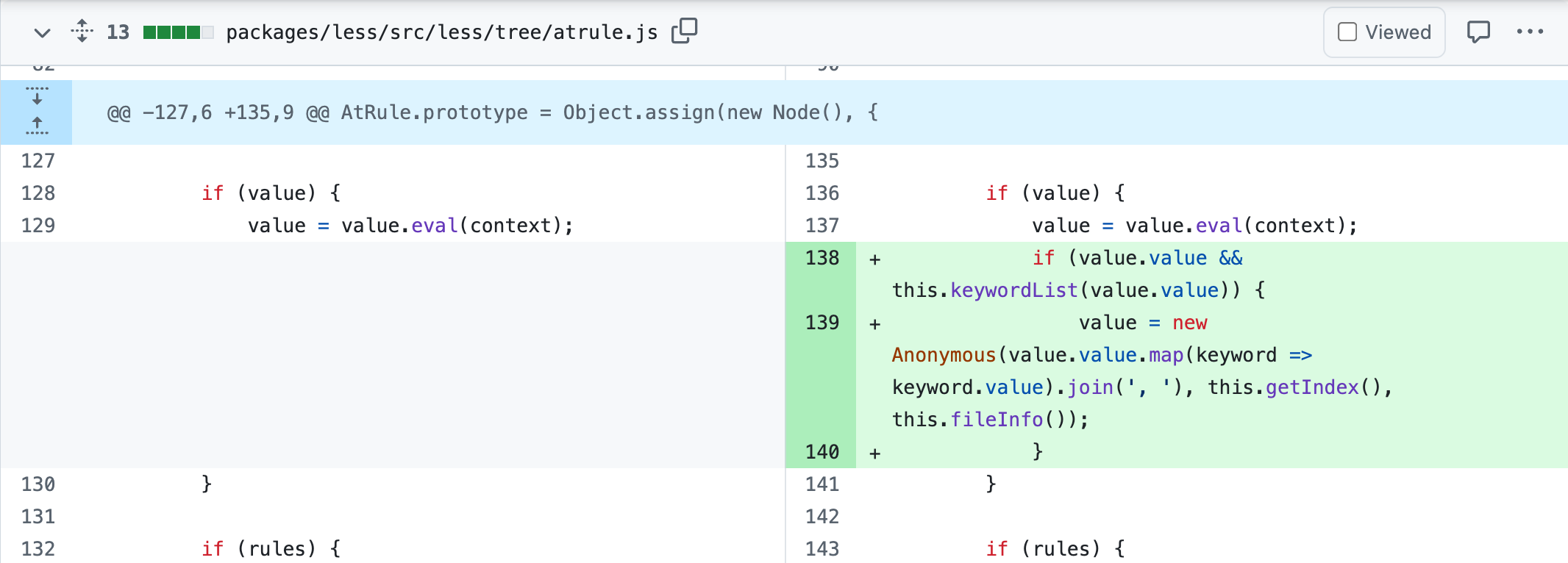
Searching the PR title in its CHANGELOG.md shows the feature shipped in v4.4.0.
Switching the Playground back to 4.3.0 for a quick check confirms it.
Fixes
- Roll Less back to a version before 4.4.0. You can use pnpm.overrides to pin sub-dependency versions by scope.
- If you don’t want to roll back, wait for a fixed release. There’s already a fix PR, though it hasn’t been merged by the maintainer yet.
- If you neither want to roll back nor wait, wrap the rules after @apply in
~"", e.g.@apply ~"mb-2 pt-3". Less won’t insert commas then, but the downside is that your IDE may lose Tailwind autocompletion while you type. - If all of the above feel like too much and you need to ship now, the fastest option is to change the style to
lang="css"so it skips less-loader entirely.
{
    "pnpm": {
        "overrides": {
            "less": "4.3.0"
        }
    }
}
Debugging Takeaways
- Use experience and build-tooling fundamentals to list likely causes, then confirm or rule out each hypothesis one by one
- If an error message is distinctive, search for it directly to find where it comes from
- Editing node_modules directly is very effective, just remember to make your logging conditional
Topics covered:
- How Vue SFCs work
- Webpack’s loader mechanism and execution order
- How Tailwind works under the hood