Piping Mobile WebView Console Logs into Native App Logs
Background
In hybrid mobile development, we often embed RN or a WebView, and their JS runs in its own engine.
For example:
- RN runs its JS in Hermes
- In iOS’s WKWebView, JS runs on the JavaScriptCore engine
- In Android’s WebView, JS runs in the V8 engine.
By default, nothing printed through their console.log (or info/warn/error and the rest of the family) makes it into the native app’s logs.
So when a bug shows up and you need to reconstruct what happened, on iOS you usually have to open Safari and inspect the console to read the logs, which is a real pain.
Logs are usually the most complete record of the “crime scene”, so the idea is to route WebView logs into the native app’s own logs.
Here’s a quick walkthrough of how to hook web page logs into the native side on iOS and Android. The two platforms work a bit differently.
Groundwork
On iOS, pages are usually loaded in a WKWebView, and we can intercept logs via the WKScriptMessageHandler protocol. The steps are:
- In the HTML page, override the methods on the
consoleobject so they send log messages to native code throughwindow.webkit.messageHandlers - On the native side, in the VC that owns the WebView, implement the WKScriptMessageHandler protocol method
(void)userContentController:(WKUserContentController *)userContentController didReceiveScriptMessage:(WKScriptMessage *)message
Android provides the WebChromeClient class. A WebView can take your own implementation via setWebChromeClient(new WebChromeClient(...)), and you can log by overriding the onConsoleMessage method in that class.
Approach
- In the HTML page, override
console.log,console.error,console.warnand friends so they first pass the message to WKWebView viawindow.webkit.messageHandler.postMessage, then run their original logic. - In iOS native code, have the VC that owns the WebView implement the
WKScriptMessageHandlerprotocol to capture these logs, then call the native logging method. - In Android native code, hook console output manually via setWebChromeClient and call the native logging method.
The HTML side
Plain HTML
<!DOCTYPE html>
<html lang="en">
<head>
    <meta charset="UTF-8">
    <meta name="viewport" content="width=device-width, initial-scale=1.0">
    <title>Console Hook Example</title>
    <script>
        // Override console methods
        const originalConsoleLog = console.log;
        const originalConsoleInfo = console.info;
        const originalConsoleError = console.error;
        const originalConsoleWarn = console.warn;

        console.log = function() {
            const message = Array.from(arguments).join(' ');
            window.webkit.messageHandlers.ConsoleLog.postMessage({ type: 'log', message });
            originalConsoleLog.apply(console, arguments);
        };

        console.info = function() {
            const message = Array.from(arguments).join(' ');
            window.webkit.messageHandlers.ConsoleLog.postMessage({ type: 'info', message });
            originalConsoleInfo.apply(console, arguments);
        };

        console.error = function() {
            const message = Array.from(arguments).join(' ');
            window.webkit.messageHandlers.ConsoleLog.postMessage({ type: 'error', message });
            originalConsoleError.apply(console, arguments);
        };

        console.warn = function() {
            const message = Array.from(arguments).join(' ');
            window.webkit.messageHandlers.ConsoleLog.postMessage({ type: 'warn', message });
            originalConsoleWarn.apply(console, arguments);
        };
    </script>
</head>
<body>
    <button onclick="console.log('This is a log message')">Print log</button>
    <button onclick="console.info('This is an info message')">Print log</button>
    <button onclick="console.error('This is an error message')">Print error</button>
    <button onclick="console.warn('This is a warning message')">Print warning</button>
</body>
</html>Next.js
If you’re on Next.js, you can do it like this:
Next.js provides a <Script/> component with a prop called strategy that controls where the script gets injected.
The loading strategy of the script. There are four different strategies that can be used:
beforeInteractive: Load before any Next.js code and before any page hydration occurs.afterInteractive: (default) Load early but after some hydration on the page occurs.lazyOnload: Load during browser idle time.worker: (experimental) Load in a web worker.
Scripts with
beforeInteractivewill always be injected inside the head of the HTML document regardless of where it’s placed in the component. This strategy should only be used for critical scripts that need to be fetched as soon as possible.
We can pick the beforeInteractive strategy so the script is injected as early as possible.
<Script id="hook-console-log" strategy="beforeInteractive">
    {/* Put the script from above here`*/}
</Script>
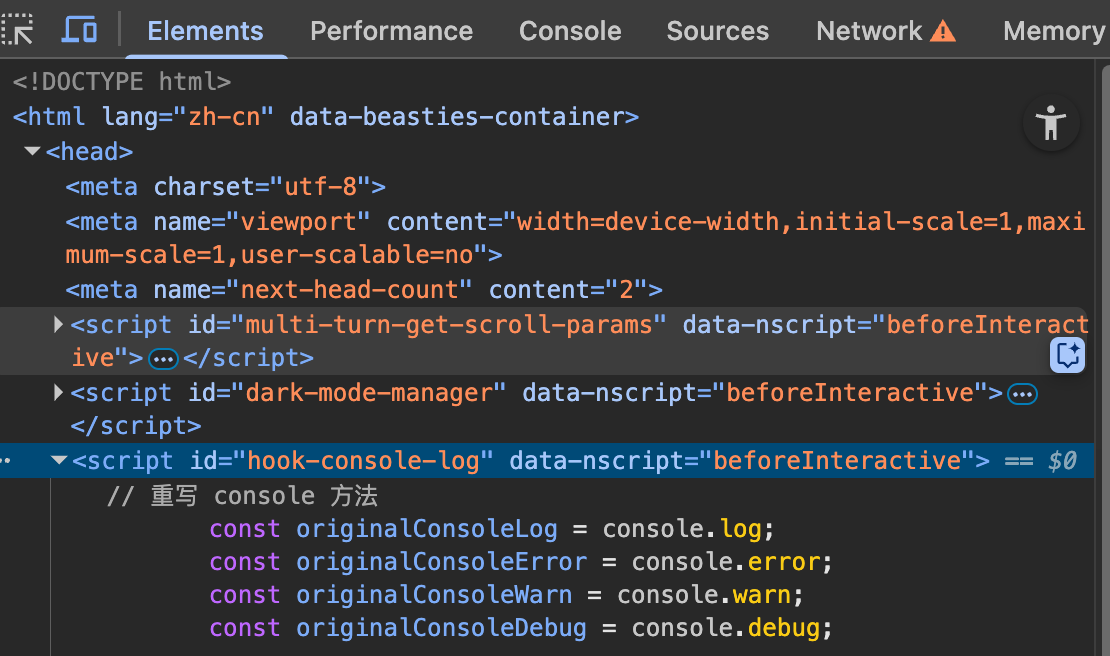
And sure enough, it ends up inside the head:
iOS
Steps
Make MyWebViewController conform to the WKScriptMessageHandler protocol
// MyWebViewController.h
#import <UIKit/UIKit.h>
#import <WebKit/WebKit.h>

@interface MyWebViewController : UIViewController <WKScriptMessageHandler>

// Other property and method declarations
@end
Implement the userContentController:didReceiveScriptMessage: method of the WKScriptMessageHandler protocol.
// MyWebViewController.m
#import "MyWebViewController.h"

@implementation MyWebViewController

// Implement the WKScriptMessageHandler protocol method
- (void)userContentController:(WKUserContentController *)userContentController didReceiveScriptMessage:(WKScriptMessage *)message {
    // Handle the received message
    if ([message.name isEqualToString:@"ConsoleLog"]) {
        // Handle this specific message
        NSLog(@"Received message: %@", message.body);
    }
}

// Other method implementations
@end
Create a WKUserContentController instance that receives the event, then assign it to the userContentController of WKWebViewConfiguration
// Set up the message handler in some method
WKWebViewConfiguration *config = [[WKWebViewConfiguration alloc] init];

WKUserContentController *userContentController = [[WKUserContentController alloc] init];

[userContentController addScriptMessageHandler:self name:@"ConsoleLog"]; // self here is the MyWebViewController instance
config.userContentController = userContentController;

WKWebView *webView = [[WKWebView alloc] initWithFrame:self.view.bounds configuration:config];
Code example
Here’s a complete example:
// MyWebViewController.h
#import <UIKit/UIKit.h>
#import <WebKit/WebKit.h>

@interface MyWebViewController : UIViewController <WKScriptMessageHandler>

@end

// MyWebViewController.m
#import "MyWebViewController.h"

@implementation MyWebViewController

- (void)viewDidLoad {
    [super viewDidLoad];

    WKWebViewConfiguration *config = [[WKWebViewConfiguration alloc] init];
    WKUserContentController *userContentController = [[WKUserContentController alloc] init];
    [userContentController addScriptMessageHandler:self name:@"ConsoleLog"];
    config.userContentController = userContentController;

    WKWebView *webView = [[WKWebView alloc] initWithFrame:self.view.bounds configuration:config];
    [self.view addSubview:webView];

    NSString *html = @"<html><body><button onclick=\"window.webkit.messageHandlers.ConsoleLog.postMessage('Hello from JavaScript')\">Send Message</button></body></html>";
    [webView loadHTMLString:html baseURL:nil];
}

// Handle messages sent from JavaScript
- (void)userContentController:(WKUserContentController *)userContentController didReceiveScriptMessage:(WKScriptMessage *)message {
    if ([message.name isEqualToString:@"ConsoleLog"]) {
        NSDictionary *logInfo = message.body;
        NSString *logType = logInfo[@"type"];
        NSString *logMessage = logInfo[@"message"];

        if ([logType isEqualToString:@"log"]) {
            NSLog(@"Console Log: %@", logMessage);
        } else if ([logType isEqualToString:@"error"]) {
            NSLog(@"Console Error: %@", logMessage);
        } else if ([logType isEqualToString:@"warn"]) {
            NSLog(@"Console Warn: %@", logMessage);
        }
    }
}

@end
This example shows how to make MyWebViewController conform to the WKScriptMessageHandler protocol and handle messages sent from JavaScript.
Android
Code example
In MainActivity.java, configure the WebView: enable JavaScript, set a WebChromeClient, and override onConsoleMessage to intercept and handle the page’s console output. Based on the message level (LOG, ERROR, WARN, etc.), forward each message to Android’s logging system.
import android.os.Bundle
import android.util.Log
import android.webkit.ConsoleMessage
import android.webkit.WebChromeClient
import android.webkit.WebView
import android.webkit.WebViewClient
import androidx.appcompat.app.AppCompatActivity

class MainActivity : AppCompatActivity() {

    private lateinit var webView: WebView

    override fun onCreate(savedInstanceState: Bundle?) {
        super.onCreate(savedInstanceState)
        setContentView(R.layout.activity_main)

        webView = findViewById(R.id.webView)

        // Enable JavaScript
        webView.settings.javaScriptEnabled = true

        // Set a WebViewClient
        webView.webViewClient = WebViewClient()

        // Set a WebChromeClient to handle console output
        webView.webChromeClient = object : WebChromeClient() {
            override fun onConsoleMessage(consoleMessage: ConsoleMessage): Boolean {
                // Handle console output
                val message = consoleMessage.message()
                val sourceId = consoleMessage.sourceId()
                val lineNumber = consoleMessage.lineNumber()
                val messageLevel = consoleMessage.messageLevel()

                when (messageLevel) {
                    ConsoleMessage.MessageLevel.LOG -> {
                        Log.d("WebViewConsole", "Log: $message (Source: $sourceId, Line: $lineNumber)")
                    }
                    ConsoleMessage.MessageLevel.ERROR -> {
                        Log.e("WebViewConsole", "Error: $message (Source: $sourceId, Line: $lineNumber)")
                    }
                    ConsoleMessage.MessageLevel.WARN -> {
                        Log.w("WebViewConsole", "Warn: $message (Source: $sourceId, Line: $lineNumber)")
                    }
                    ConsoleMessage.MessageLevel.DEBUG -> {
                        Log.d("WebViewConsole", "Debug: $message (Source: $sourceId, Line: $lineNumber)")
                    }
                    ConsoleMessage.MessageLevel.TIP -> {
                        Log.i("WebViewConsole", "Tip: $message (Source: $sourceId, Line: $lineNumber)")
                    }
                }

                return true
            }
        }

        // Load an HTML file or URL
        webView.loadUrl("file:///android_asset/index.html")
    }
}
Summary
To wrap up:
- iOS can’t hook console output directly from native code, so we inject a script at the very top of the HTML that overrides every console logging method up front, and add messaging logic on both the web and native sides. In effect, every log gets a copy siphoned off to native;
- Android can hook console output directly, so no messaging layer is needed.